Unit 2
HTML Image

HTML Image Syntax
The HTML <img> tag is used to embed an image in a web page. Images are not technically inserted into a web page; images are linked to web pages. The <img> tag creates a holding space for the referenced image. The <img> tag is empty, it contains attributes only, and does not have a closing tag. The <img> tag has two required attributes:
• src - Specifies the path to the image
• alt - Specifies an alternate text for the image
Iamge Size – Width and Height
You can use the style attribute to specify the width and height of an image.


Accessing Image in another Folder
If you have your images in a sub-folder, you must include the folder name in the src attribute:

Image Floating
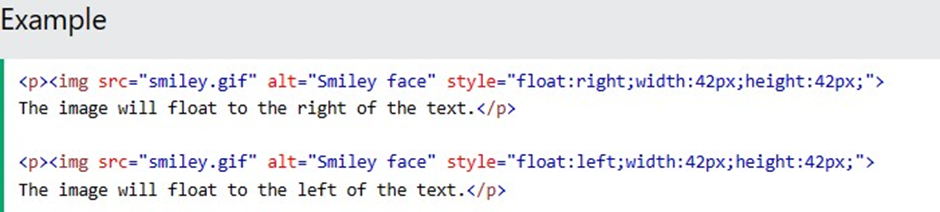
Use the CSS float property to let the image float to the right or to the left of a text:
HTML Background Image
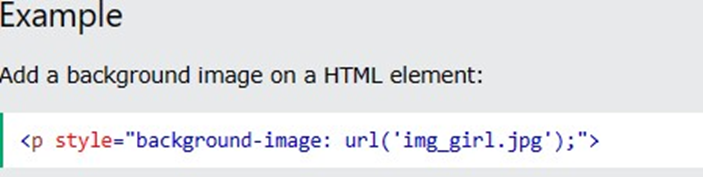
A background image can be specified for almost any HTML element. To add a background image on an HTML element, use the HTML style attribute and the CSS backgroundimage property:
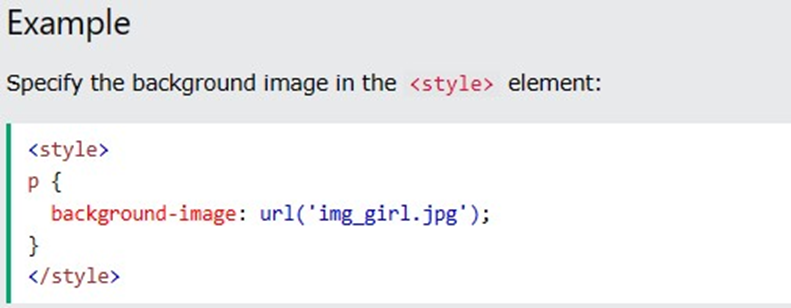
You can also specify the background image in the <style> element, in the <head> section:
HTML <Picture> Element
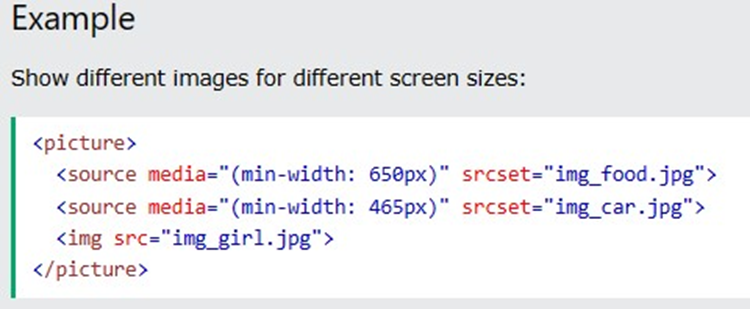
The HTML <picture> element allows you to display different pictures for different devices or screen sizes. The HTML <picture> element gives web developers more flexibility in specifying image resources.
The <picture> element contains one or more <source> elements, each referring to different images through the srcset attribute. This way the browser can choose the image that best fits the current view and/or device. Each <source> element has a media attribute that defines when the image is the most suitable.