Organization & Structure of a Computer System.
| Site: | Newgate University Minna - Elearning Platform |
| Course: | Foundations of Computing |
| Book: | Organization & Structure of a Computer System. |
| Printed by: | Guest user |
| Date: | Sunday, 11 October 2026, 12:53 PM |
Table of contents
- 1. Computer Systems and Software
- 2. Computer System Organization
- 3. Key Differences
- 4. Memory Hierarchy
- 5. Address
- 6. Data Transfer Methods
- 7. Computer System Architecture
- 8. Key Features
- 9. CISC (Complex Instruction Set Computer) Architecture
- 10. Parallel Architecture
- 11. ASSESSMENT
- 12. COMPUTER SOFTWARE
- 13. Software Architecture
- 14. APPLICATION SOFTWARE
- 15. CATEGORIES OF APPLICATION PACKAGES AND ASSESSMENT
- 16. DATA, INFORMATION AND KNOWLEDGE.
- 17. Metadata and Assessment
1. Computer Systems and Software
Organization & Structure of a Computer System.
The expected outcome of introducing the organization and structure of a computer system is to provide individuals with a foundational understanding of how computers work at a conceptual level
Student are expected to:
1. Should comprehend the fundamental concept of the Von Neumann architecture and how it forms the basis for most modern computers.
2. Should be aware of the role of the CPU, control unit, and ALU in processing instructions and performing operations.
3. Should be familiar with the concept of the bus system and Address and their roles in data transfer between components.
Introduction
A computer system is a complex combination of hardware and software that works together to process data, execute instructions, and provide output.
A computer system is a complex assembly of hardware and software components designed to perform computational tasks. The organization and structure of a computer system define how its various components interact and function efficiently. Understanding these concepts is essential for designing, using, and troubleshooting computer systems.
All computer types have the same basic computer structure and function. They all follow basic operations. These operations are responsible for converting raw input data into some information that is useful for the users of computers.2. Computer System Organization
1. Computer System Organization
Computer system organization refers to the operational structure and interaction between the system's hardware components. It describes how components communicate to execute instructions and process data. The key elements of computer organization include:
a. Central Processing Unit (CPU)
The CPU is the brain of the computer system, responsible for executing instructions. It consists of three main components:
1. Arithmetic Logic Unit (ALU): Performs arithmetic and logical operations.
2. Control Unit (CU): Directs the flow of data and instructions within the CPU.
3. Registers: Small, high-speed storage locations for immediate data processing.
CPU Operations
The CPU follows the Fetch-Decode-Execute Cycle:
1. Fetch: Retrieves an instruction from memory.
2. Decode: Interprets the instruction.
3. Execute: Carries out the instruction.
4. Store – The result is saved in memory or sent to an output device.
Registers and caches are both types of storage in a computer system, but they serve different purposes and are located at different levels in the memory hierarchy.
- Registers:
- Location: Registers are the smallest and fastest type of storage in a CPU. They are located directly within the CPU.
- Purpose: Registers store data that the CPU is actively using or manipulating during its operations. They are used for quick access to operands and intermediate results.
- Size: Registers are very small in number and size. Modern CPUs typically have a set of general-purpose registers and special-purpose registers.
- Access Time: Registers have the fastest access time among all storage types.
- Cache:
- Location: Cache is a type of high-speed volatile computer memory located between the CPU and the main memory (RAM).
- Purpose: The primary purpose of cache is to store copies of frequently accessed data and instructions from the main memory. This helps in reducing the time taken to access data by providing a faster intermediate storage.
- Size: Cache is larger than registers but smaller than main memory. It is divided into levels, such as L1 (closest to the CPU), L2, and sometimes L3.
- Access Time: Cache has faster access times than main memory but slower than registers.
https://www.youtube.com/watch?v=zAHfX7hrmz4
3. Key Differences
Key Differences:
- Location: Registers are located directly within the CPU, while cache is situated between the CPU and main memory.
- Purpose: Registers store actively used data for immediate CPU operations, while cache stores frequently accessed data to reduce memory access time.
- Size: Registers are very small in size and number, whereas cache is larger but still smaller than main memory.
- Access Time: Registers have the fastest access time, followed by cache, which is faster than main memory.
- Visibility: Programmers typically don't have direct control over registers; they are managed by the CPU. Cache, on the other hand, often has various levels, and some control (e.g., cache management policies) may be exposed to software or system architects.
Registers and Cache are both crucial components for optimizing the performance of a computer system. Registers are essential for the immediate operations of the CPU, while cache helps in bridging the speed gap between the CPU and main memory by storing frequently accessed data.
In a computer system, a bus and an address play critical roles in facilitating communication between various components. Let's look at each concept:
b. Memory (Storage)
Memory in a computer system is divided into primary and secondary storage:
1. Primary Memory (RAM & ROM):
o Random Access Memory (RAM): Temporary, volatile memory used for active processing.
o Read-Only Memory (ROM): Permanent, non-volatile memory containing firmware and boot instructions.
2. Secondary Storage:
o Hard Disk Drives (HDDs), Solid State Drives (SSDs), and other external storage devices store data persistently.
4. Memory Hierarchy
Memory Hierarchy
1. Registers (Fastest, Smallest)
2. Cache Memory
3. RAM (Main Memory)
4. Secondary Storage (Slowest, Largest)
c. Input and Output Devices
1. Input Devices: Allow users to send data and commands (e.g., keyboard, mouse, scanner).
2. Output Devices: Display results of computation (e.g., monitor, printer, speakers).
d. System Bus
A system bus facilitates communication between components. It consists of:
1. Data Bus: Transfers data between components.
2. Address Bus: Specifies memory addresses for data access.
3. Control Bus: Sends control signals to direct operations.
SYSTEM BUS AND DATA TRANSFER
A system bus is a communication pathway used to transfer data between computer components.
Bus:
A bus in a computer system is a communication system that transfers data between components, such as the CPU, memory, and input/output devices. A Computer buses can be in form of wired cables, or electrical wires embedded in the Computer Motherboard PCB (PRINTED CIRCUIT BOARD) visible on the rear side of Motherboard. serves as a pathway for electrical signals or data to travel between different parts of the computer.
- Data Bus:
- Address Bus:
- Control Bus:
- Types of Buses:
- System Bus: Connects the CPU to memory.
- I/O Bus: Connects the CPU to peripheral devices.
- Address Bus: Carries addresses.
- Data Bus: Carries data.
- Control Bus: Manages control signals.
5. Address
- Address:
A Bus provides a communication pathway for data transfer within a computer system, while an address is a unique identifier specifying the location of data or instructions in memory. Together, they are essential components for the proper functioning of a computer, enabling the CPU to interact with memory and other peripherals.
Input/Output controllers manage communication between the CPU and peripheral devices such as printers, hard drives, and network interfaces.
6.1 Types of Buses
· Data Bus: Transfers data between the CPU and memory. It carries data between the CPU, memory, and peripherals. The width of the data bus (measured in bits) determines how much data can be transferred in a single bus cycle.
· Address Bus: Transfers memory addresses from the CPU to other components. It is responsible for carrying memory addresses, indicating the location in memory where data should be read from or written to. An address in a computer system refers to a unique identifier that specifies the location of data or instructions in the computer's memory. Each byte of data in the computer's memory has a unique address.
- Memory Address: In the context of RAM (Random Access Memory), an address refers to the location of a specific byte of data in the memory. Memory addresses are used by the CPU to read or write data from or to specific locations in memory.
- I/O Address: In the context of Input/Output operations, an address is used to specify the location of a particular device or register in the I/O space.
- Address Space: The total range of addresses that a computer system can use. The size of the address space determines the maximum amount of memory a system can address.
- Physical vs. Virtual Addresses: Physical addresses refer to the actual locations in the computer's physical memory, while virtual addresses are used by programs and are translated into physical addresses by the memory management unit.
6. Data Transfer Methods
6.2 Data Transfer Methods
· Serial Transfer: One bit at a time.
· Parallel Transfer: Multiple bits simultaneously.
· Direct Memory Access (DMA): Allows peripherals to transfer data without CPU intervention.
e. I/O Controllers
The structure of a computer is simple, and that can be represented in below diagram −
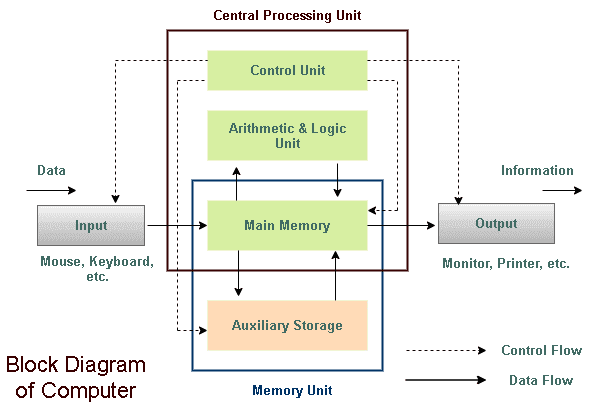
Logical Organization of a Computer
· Input unit
· Central processing unit
· Output unit
· Memory unit
7. Computer System Architecture
Computer System Architecture
Architecture describes the logical structure and operational principles of a computer. The most common architectures are:
Computer System Architecture
Computer systems are categorized into different architectures based on how they process data and execute instructions.
This describes a design architecture for an electronic digital computer with parts consisting of Computer Technology
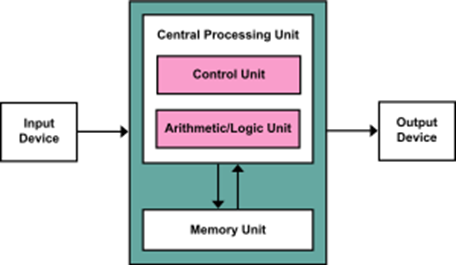
Types of Computer Architecture
1. Von Neumann Architecture
This is the most widely used computer architecture, based on the model proposed by John von Neumann in 1945. John von Neumann, along with others, proposed the concept of the stored program that we use even today. The idea was to keep a program in the memory and read the instructions from it. He also proposed an architecture that clearly identified the components we have presented previously: ALU, control, input, output, and memory as illustrated in Figure 1. This architecture is known as the von Neumann architecture.
This architecture uses what is known as the stored program model. In the von Neumann architecture, the stored program is the most important aspect of the von Neumann model.
8. Key Features
Key Features:
- Uses a single memory unit to store both instructions and data.
- Instructions are executed sequentially.
- Uses the fetch-decode-execute cycle.
- Commonly used in personal computers, laptops, and general-purpose processors.
Advantages:
✔
Simpler design and cost-effective.
✔ Supports modern
programming languages easily.
Disadvantages:
✖
The Von Neumann Bottleneck (slow memory access due to shared bus).
✖ Performance is limited
by memory speed.
2. Harvard Architecture
This architecture was developed to overcome the bottleneck in Von Neumann systems by using separate memory for instructions and data.
Key Features:
- Separate memory for instructions and data.
- Instructions and data can be accessed simultaneously, improving performance.
- Used in embedded systems, digital signal processors (DSPs), and microcontrollers.
Advantages:
✔
Faster execution due to separate buses.
✔ Reduces data corruption
risks.
Disadvantages:
✖
More complex and expensive to implement.
✖ Limited flexibility in
memory usage.
9. CISC (Complex Instruction Set Computer) Architecture
3. CISC (Complex Instruction Set Computer) Architecture
CISC systems have a large set of instructions that perform complex tasks in fewer lines of code.
Key Features:
- Single instructions can perform multiple low-level operations.
- Instructions take varying amounts of time to execute.
- Used in Intel x86 processors and older mainframes.
Advantages:
✔
Requires less memory for complex programs.
✔ Simplifies compiler
design.
Disadvantages:
✖
More complex hardware design.
✖ Slower execution due to
complex instruction decoding.
4. RISC (Reduced Instruction Set Computer) Architecture
RISC architecture simplifies the instruction set, allowing for faster execution.
Key Features:
- Uses a small set of simple instructions.
- Instructions are executed in a single clock cycle.
- Used in ARM processors, modern mobile devices, and gaming consoles.
Advantages:
✔
Faster execution speed.
✔ Simplified hardware
design.
Disadvantages:
✖
Requires more memory for program execution.
✖ More dependency on
compiler optimization.
10. Parallel Architecture
5. Parallel Architecture
This architecture focuses on executing multiple instructions at the same time.
Key Features:
- Uses multiple processors or cores.
- Improves performance in high-performance computing.
- Found in supercomputers and modern multi-core processors.
Advantages:
✔
Increases speed and efficiency.
✔ Handles large-scale
computations effectively.
Disadvantages:
✖
More complex programming and hardware.
✖ High power consumption.
6. Distributed Architecture
This architecture consists of multiple computers connected via a network, working together to complete tasks.
Key Features:
- Each system operates independently but shares tasks.
- Used in cloud computing, blockchain, and data centers.
Advantages:
✔
Increases scalability and fault tolerance.
✔ Efficient resource
utilization.
Disadvantages:
✖
Network latency can affect performance.
✖ More complex to manage
and secure.
NOTE
Different computer architectures serve different needs. While Von Neumann and Harvard architectures are fundamental, RISC and CISC architectures are used in modern processors. Parallel and distributed architectures are crucial for high-performance computing. Understanding these architectures helps in choosing the right system for specific applications.
11. ASSESSMENT
ASSESSMENT
Essay Questions
- Explain the advantages and disadvantages of Von Neumann and Harvard architectures.
- Discuss the role of parallel and distributed architectures in modern computing.
- How does RISC architecture improve processing speed compared to CISC architecture?
- Describe the main features of Harvard Architecture and its applications in real-world computing.
- Explain the importance of computer architecture in designing efficient computer systems.
6. Define computer architecture and explain why it is important.
7. Compare Von Neumann and Harvard Architectures with at least two differences.
8. What is the Von Neumann Bottleneck, and how does it affect system performance?
9. Explain the difference between RISC and CISC architectures.
10. Give two real-world applications of parallel architecture.
12. COMPUTER SOFTWARE
SOFTWARE: can be defined as the sets of programs that enable the computer to work. It can also be defined as a program written by a programmer or software developer in order to solve a particle specific task, or as step-by-step instructions that tell the hardware what to do.
Software can be divided into two parts/categories.
Ø System software
Ø Application software
(A) SYSTEM SOFTWARE- These is sets of software that acts as interface between the computer resources and the users. It can also be defined as computer software designed to operate the computer hardware and to provide and maintain a platform for running application software.
FUNCTION OF SYSTEM SOFTWARE
1. Facilities the running of user program
2. Optimize the performance of the computer
3. Provide assistance with program development
4. Simplify the use of the computer system
TYPES OF SYSTEM SOFTWARE
1. Operating System (O S)
2. System services which are utility software and translators
3. Loaders
Diagnostic program13. Software Architecture
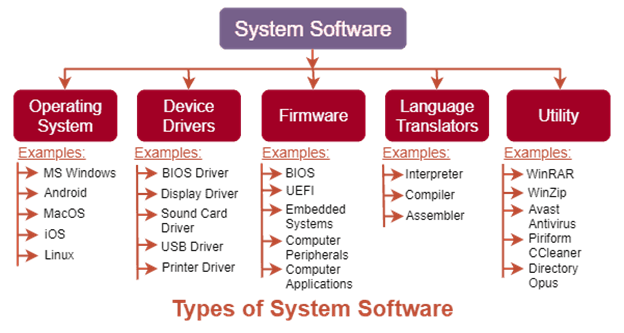
OPERATING SYSTEM (O S) –can be define as an organized collection of software extensions for hardware control routines for operating a computer and for providing an environment for execution of programs.
An operating system (OS) is system software that manages computer hardware and software and provides common services for computer programs.
An operating system (OS) is a program that manages the computer's resources --- its CPU, primary storage, its input/output devices --- so that the resources can be correctly and fairly used by one or more persons and/or computer programs
It can also be defined as a collection of programs that facilities the effective management of all these resources (hardware and software).
EXAMPLES OF OPERATING SYSTEM
1. LINUX
2. MS-DOS (MICROSOFT DISK OPERATING SYSTEM)
3. UNIX
4. XENIX
5. NOVELL NETWARE
6. macOS
7. IOS
8. ANDROID
9. MICROSOFT WINDOWS (MS WINDOWS : VERSION OF MS WINDOWS)
ü WINDOW VISTA
ü WINDOWS 95
ü WINDOWS 98
ü WINDOWS 2000
ü WINDOWS ME (M4ILLENNIUM EDITION)
ü WINDOWS 7
ü WINDOWS 8
ü WINDOWS 8.1
ü WINDOWS 10
ü WINDOWS 11
ü WINDOWS X P EXPERIENCE
ü WINDOWS N T, (NEW TECHNOLOGY)
ü WINDOWS SERVER 2003
|
List of Operating Systems |
|
|
Name of the OS |
Release Date |
|
UNIX |
1969 |
|
MS-DOS |
1981 |
|
Windows |
1985 |
|
Blackberry OS |
1999 |
|
Mac OS |
2001 |
|
Ios |
2007 |
|
Android |
2008 |
|
Windows Phone |
2010 |
|
Chrome OS |
2011 |
|
Firefox OS |
2013 |
14. APPLICATION SOFTWARE
(A) APPLICATION SOFTWARE
Application software is programs written to solve user’s problems. They are divided into two
I.User application
II.Application packages
Ø USER APPLICAFTION SOFTWARE: refers to as programs written for the user within an organization or programs written to solve specific user needs. It’s called also tailor-made / purpose written application software
Examples of user application software might include:
· Enterprise Resource Planning (ERP) Systems: Custom-built to integrate and manage various business processes such as finance, human resources, and supply chain management.
· Customer Relationship Management (CRM) Software: Tailor-made to manage customer interactions, track sales leads, and streamline customer-related processes.
· Inventory Management Systems: Customized to efficiently track and manage inventory levels, orders, and supply chain logistics.
· Data Analysis and Reporting Tools: Developed to analyze and present data in a way that aligns with the specific requirements of an organization.
Ø APPLICATION PACKAGES: These are commercialized software designed to perform various categories of user function.
Application package can also be defined as software designed to perform a group of coordinated functions, tasks, or activities for the benefits of the user
EXAMPLES OF AN APPLICATION PACKAGE
1. Word processor
2. Spreadsheet
3. Web processor
4. Web browser
5. Email client
6. Media player
7. Console game
15. CATEGORIES OF APPLICATION PACKAGES AND ASSESSMENT
CATEGORIES OF APPLICATION PACKAGES
I.Application specific
II.General purpose application packages
I. Application specific: These are programs written in order to solve a particular task/problem. Examples of application specific are
1. Payroll
2. Stock control
3. Accounting software
4. Education management
5. Statistical software
6. Web design software
II. General purpose application: These are programs written in order to provide users with general set of facilities to handle a wide variety of problems. Examples of general purpose application are
1. Word processing
2. Graphics software
3. Game software
4. Database software
ASSESSMENT
Explain these application specific software and state two examples of each
- Stock control
- Accounting software
- Education management
- Statistical software
- Web design software
16. DATA, INFORMATION AND KNOWLEDGE.
DATA, INFORMATION AND KNOWLEDGE.
Course Description: This course provides a comprehensive exploration of the fundamental concepts of data, information, and knowledge, which are the building blocks of information science and play a crucial role in the modern digital age. Understanding how data is transformed into information and, subsequently, knowledge is essential for individuals pursuing careers in data science, information management, or those who wish to harness the power of information in various domains.
Course Objectives:
- Define and differentiate between data, information, and knowledge.
- Explore the characteristics and properties of data.
- Examine the processes and methods for transforming data into information.
- Discuss the role of context and interpretation in the creation of knowledge.
- Investigate the ethical and privacy considerations associated with data and information.
- Foster critical thinking and problem-solving skills related to data and knowledge management.
INTRODUCTION
The first two components of information systems: hardware and software. However, those two components by themselves do not make a computer useful. Imagine if you turned on a computer, started the word processor, but could not save a document. Imagine if you opened a music player but there was no music to play. Imagine opening a web browser but there were no web pages. Without data, hardware and software are not very useful! Data is the third component of an information system.
DATA
Data are the raw bits and pieces of information with no context. If I told you, “15, 23, 14, 85,” you would not have learned anything. But I would have given you data.
There are two main types of data:
Data can be quantitative or qualitative.
- Quantitative data is provided in numerical form, like the weight, volume, or cost of an item. Quantitative data is numeric, the result of a measurement, count, or some other mathematical calculation
- Qualitative data is descriptive, but non-numerical, like the name, sex, or eye color of a person. Qualitative data is descriptive. “Ruby Red,” the color of a 2013 Ford Focus, is an example of qualitative data. A number can be qualitative too: if I tell you my favorite number is 5, that is qualitative data because it is descriptive, not the result of a measurement or mathematical calculation.
Data Examples
- The number of visitors to a website in one month
- Inventory levels in a warehouse on a specific date
- Individual satisfaction scores on a customer service survey
17. Metadata and Assessment
Metadata is simply defined as data about data. It means it is a description and context of the data. It helps to organize, find and understand data. A real-world example of metadata:
Every time you take a photo with today’s cameras a bunch of metadata is gathered and saved with it. Such as
- File name,
- Size of the file,
- Date and time,
- Camera settings etc.
INFORMATION
By itself, data is not that useful. To be useful, it needs to be given context (The circumstances and settings that provide background information about an event, statement, or idea. It also helps to fully understand something). Returning to the example above, if I told you that “15, 23, 14, and 85″ are the numbers of students that had registered for upcoming classes that would be information. By adding the context – that the numbers represent the count of students registering for specific classes – I have converted data into information.
KNOWLEDGE
Once we have put our data into context, aggregated and analyzed it, we can use it to make decisions for our organization. We can say that this consumption of information produces knowledge. This knowledge can be used to make decisions, set policies, and even spark innovation. Knowledge goes beyond the individual pieces of information and involves insights, understanding, and the ability to apply information in a meaningful way.
Example: Knowing that high temperatures in a particular season can lead to increased demand for air conditioners, which can be valuable information for businesses.
The progression from data to knowledge involves a process of refining and organizing information to extract meaningful insights and understanding.
Key Differences between Data, Information and Knowledge
- Data is fragmented pieces of symbols and characters strung together, information is refined data whereas knowledge is useful information. Additionally, data can lack context when looked at singularly, whereas information gives context to data and knowledge brings depth in understanding to such information.
- It is noteworthy that data is incomprehensible independently, but the outcome of information is comprehension while the outcome of knowledge is understanding. Data is meaningless without being compiled into a sensible structure, while information improves representation and knowledge amplifies consciousness.
- Data and Information alone are not sufficient to make any predictions while knowledge prediction is possible if one possesses the required experience.
- You can’t use Data to make any statements, while information is data strung together, forming statements. Knowledge brings the ability to have a deduced conclusion using pieces of information together.
- Data cannot independently be a basis for question formation; Information is a text that answers the questions a who, when, what, or where while knowledge is a text that answers the questions of why and how. The final difference we can consider is that data and information are easily transferable while transferring knowledge requires learning.
ASSESSMENT
1. What is the fundamental difference between data and information?
2. Provide an example of raw data. How does this data become meaningful in a specific context?
3. Give an example of transforming data into information. What additional characteristics does information possess compared to raw data
Define knowledge and distinguish it from information. How does knowledge go beyond the simple aggregation of information?