Unit 2: Computer Systems
| Site: | Newgate University Minna - Elearning Platform |
| Course: | Computer Applications and Systems |
| Book: | Unit 2: Computer Systems |
| Printed by: | Guest user |
| Date: | Thursday, 1 October 2026, 12:24 PM |
1. What is a Computer
A computer is an electronic machine that stores, retrieves, and manipulates or processes data. It cannot think or reason; it can only carry out instructions given to it. A set of instructions that directs its actions is called a program. Different programs are used to solve different problems. Ability to accept, store, and execute various sets of instructions (or programs) makes the computer the invaluable, all-purpose business tool.
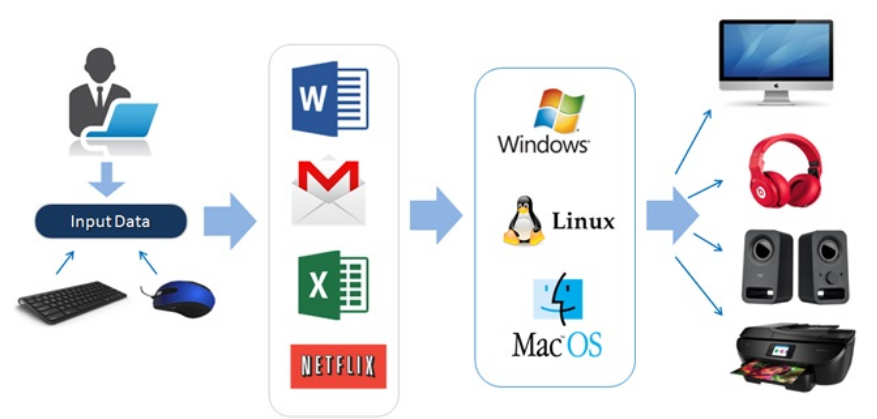
The first step of solving a problem by a computer is to develop a suitable computer program and then store in its memory. The computer then carries out the instructions in the program. The instructions of a program generally direct the computer to perform three basic functions over and over again; these functions are input, processing, and output. Collectively, these functions constitute the data processing cycle.
· Input: input devices are connected to feed the computer facts or data to be processed.
· Processing: the control and storing of data, numerical comparisons, and arithmetic operations are performed on the input data to produce the desired results.
· Output: the computer feeds the processed data or information, to the output devices.

2. Components of a Computer System
Basically, a computer system is a combination of hardware and software devices that help computers to receive data or information by communicating with each other.
A computer is used to process data and a data processing system must consist of more than just machines. A computer system must contain: hardware, software, humanware and operational procedures.
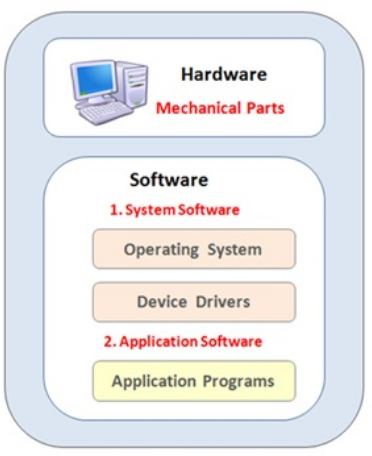
1. Hardware
Hardware generally refers to the machine or physical equipment that performs the basic functions of the data processing cycle. In addition to the computer itself, other hardware devices are also required. These devices may be off-line that is detached from the computer and operating independently or they may be on-line that is directly connected to and controlled by the computer. A printer is an off-line device and a keyboard is an on-line device.
2. Software
A program is a sequence of instructions which directs a computer to perform certain functions. A computer must have access to prewritten, stored programs to input and store data, make decisions, arithmetically manipulate and output data in the correct sequence. Programs are referred to as software. Computer system must be supported by extensive software systems. Software is generally categorized as either system software or application software.
System software consists of programs that facilitate the use of computer by a user. These programs are sometimes referred to as utility programs. They perform such standard tasks as organizing and maintaining data files, translating programs written in various languages to a language acceptable to the computer, scheduling jobs through the computer, as well as aiding in other areas of general operations. Of all the systems software supplied by the manufacturer of a computer, the most important one is known as the operating system.
Application software consists of programs to perform specific user applications. A computer program giving instructions for the steps involved in preparing results of a public examination is an example of applications software. Application programs are either purchased or written by the computer users for specific applications.
3. Humanware
Humanware refers to the persons who design, program, and operate a computer installation. There are numerous categories of jobs, but the three principal positions required in a large computer installation are system analyst, programmer, and computer operator. People in each of these areas generally perform special-purpose tasks under the supervision of a director or manager.
The position of a systems analyst requires the broad background and extensive understanding of the above three job categories. The main task of the system analyst is to study information and processing requirements. A systems analyst defines the applications problem, determines systems specifications, recommends hardware and software changes, and designs information processing procedures.
A programmer requires a comprehensive knowledge of one or more programming languages and standard coding procedures. This position does not require the broader understanding of the structure and inner workings of an application. A programmer's principal job is to code or prepare programs based on the specifications made by the systems analyst.
A computer operator requires the least extensive background of the three categories. A computer operator generally performs a series of well-defined tasks that will keep the computer operating at maximum efficiency. The operational efficiency of a computer installation is dependent on the quality and abilities of the operational staff.
4. Procedures
Operations of a data processing center require an extensive and clearly defined set of procedures for performing the essential functions of the installation. These functions generally include obtaining, preparing, and entering data into the computer, processing jobs, initiating new programs and changing or deleting old ones etc. Such procedures must have provision for actions to be taken in the event of hardware or software malfunctions.
3. Applications vs. System software
Applications use system software for access to basic hardware resources, such as memory, storage and other utilities. For example, an application relies on system software for access to the file system to manage and store files. Unlike application software, system software programs operate in the background and do not directly interface with the computer user. System software manages the operation of a computer or instance and typically includes the OS, hypervisor and drivers. These are generally low-level or basic programs as compared to end-user facing applications.