Introduction to Networking
| Site: | Newgate University Minna - Elearning Platform |
| Course: | Fundamental of Computer Networking |
| Book: | Introduction to Networking |
| Printed by: | Guest user |
| Date: | Sunday, 5 July 2026, 9:07 AM |
Description
Computer networking is the practice of connecting multiple computing devices—such as PCs, servers, routers, and IoT gadgets—to facilitate communication and resource sharing over wired or wireless links Think of networks as digital road systems where nodes (devices) exchange data via links, following agreed-upon rules called protocols
1. Introduction to Computer Networking
Course Overview and Objectives
This introductory course on computer networking aims to provide students with a foundational understanding of the principles, technologies, and practices behind how computers communicate. By the end of this course, students will be able to:
Define core concepts in computer networking.
Identify and differentiate between various types of networks.
Explain the importance of networking in modern society.
Describe the fundamental components of a network.
1.1. Basic Concepts in Networking
At its core, computer networking is the practice of connecting two or more computing devices with the purpose of sharing data, resources, and services. A network is simply a group of interconnected devices. The most fundamental concepts include:
Node: Any device connected to a network, such as a computer, printer, or server.
Link: The physical or logical connection that allows data to travel between nodes. Links can be wired (like an Ethernet cable) or wireless (like Wi-Fi).
Data Packet: A small block of data transmitted over a network. Data is broken down into these packets for efficient transfer.
Bandwidth: The maximum amount of data that can be transferred over a network connection in a given amount of time, often measured in bits per second (bps).
1.2. Importance and Applications of Computer Networks
Computer networks are the backbone of the modern digital world. They facilitate a wide range of essential applications and services, including:
1. Communication: Email, instant messaging, and video conferencing all rely on networks to connect people globally.
2. Resource Sharing: Networks allow multiple users to share resources like printers, scanners, and storage drives, which is more cost-effective than providing a separate device for each user.
3. Information Access: The internet, the largest network of all, provides unparalleled access to information, research, and entertainment.
4. E-commerce: Online shopping, banking, and digital transactions are entirely dependent on secure and reliable network connections.
5. Collaboration: Teams can work together on documents and projects in real time, regardless of their physical location.
2. Network Types
LAN, WAN, MAN, PAN
Networks are classified based on their geographical scope. Understanding these categories is crucial for designing and managing networks.
1. PAN (Personal Area Network): A network connecting devices within a very small area, typically for a single person. Examples include a Bluetooth connection between a smartphone and wireless headphones or a laptop and a wireless mouse.
2. LAN (Local Area Network): A network that connects devices within a limited geographical area, such as a home, school, or office building. Ethernet and Wi-Fi are the most common technologies used to build a LAN.
3. MAN (Metropolitan Area Network): A network that spans a larger area than a LAN, such as an entire city or a large campus. A MAN typically connects several LANs together.
4. WAN (Wide Area Network): A network that covers a broad area, spanning across cities, countries, or even continents. The internet is the most well-known example of a WAN.
2.1. NETWORK TOPOLOGY
Network topologies describe the physical or logical arrangement of connected devices in a network. There are several common types, each with unique advantages and disadvantages. A network topology describes the arrangement of devices and connections in a network, defining how data flows between nodes.
Bus Topology
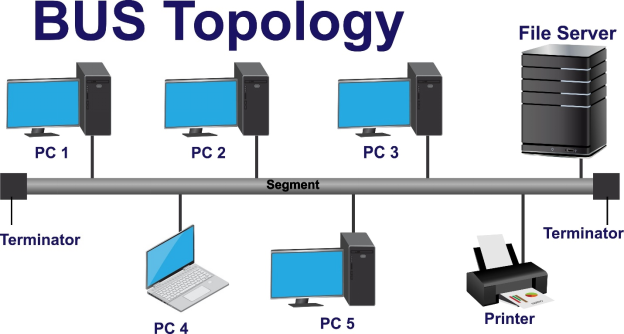
In a bus topology, all devices are connected to a single central cable, or "backbone." Data travels along this backbone in both directions, and a terminator is placed at each end to absorb the signal and prevent it from bouncing back. All devices are connected to a single central cable (the "bus"). Data travels along the bus, and each device checks if the data is intended for it.
2.2. Characteristics
Characteristics:
1. Simple and inexpensive to set up.
2. Common in early LANs (e.g., Ethernet with coaxial cables).
Advantages: It's simple to install, requires the least amount of cable, and is cost-effective.
Disadvantages: It has a single point of failure; if the main cable breaks, the entire network goes down. It's also difficult to troubleshoot, and performance can slow down with many devices due to data collisions.
2.3. Bus Topology Diagram
3. Star Topology
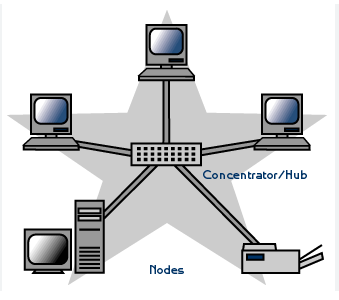
A star topology connects all network devices to a central hub or switch. Data must pass through this central device to reach any other device on the network. This is the most common topology used in modern networks, like in homes and offices. All devices connect to a central device (e.g., switch or hub). Data passes through the central device to reach its destination.
3.1. Characteristics
Characteristics:
1. Most common topology in modern LANs.
2. Centralized management via the switch/hub.
Advantages: It's highly reliable because the failure of one device or cable doesn't affect the rest of the network. It's easy to add or remove devices, and troubleshooting is simpler since you can isolate problems to a single connection.
Disadvantages: It requires a lot of cable, which can increase cost. The central hub is a single point of failure; if it fails, the entire network becomes inoperative.
3.2. Star Topology Diagram
4. Ring Topology
In a ring topology, each device is connected to exactly two other devices, forming a circular path. Data flows in a single direction (unidirectional) or both directions (bidirectional). Data packets travel from device to device until they reach their destination. Each device connects to exactly two others, forming a closed loop (ring). Data travels in one direction (or both in dual-ring setups).
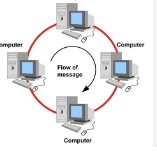
Characteristics:
1. Common in older networks like Token Ring.
2. Each device acts as a repeater to boost the signal.
Advantages: There are no data collisions because a single token (or similar mechanism) control who can send data at any given time. It offers predictable performance, even with heavy network traffic.
Disadvantages: A single device or cable failure can break the entire ring, disrupting the network. Adding or removing devices requires temporarily shutting down the network
5. Mesh Topology
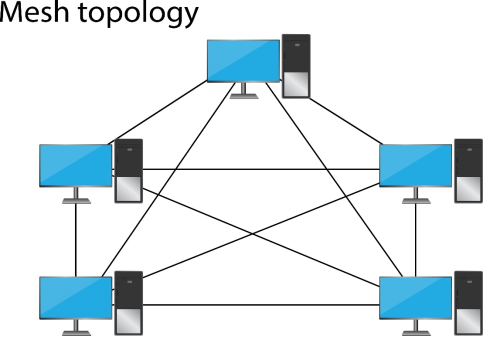
A mesh topology is a network configuration where every device is interconnected with every other device. This creates a highly redundant and reliable network with multiple paths for data to travel. Devices are interconnected, with multiple paths between nodes. Can be full mesh (every device connects to all others) or partial mesh.
Characteristics:
1. Highly reliable due to redundant paths.
2. Common in critical infrastructure (e.g., backbone networks).
Advantages: It's highly fault-tolerant; if one connection fails, data can simply be rerouted through another path. This redundancy makes it very reliable and secure. It also allows for high-speed data transfer between devices.
Disadvantages: It's extremely expensive and complex to install and maintain because it requires a huge amount of cabling and a large number of connections
5.1. Mesh Topology Diagram
6. Hybrid Topology
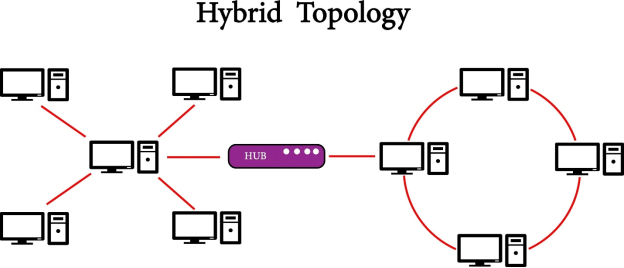
A hybrid topology is a network that combines two or more different topologies. For example, a star-bus hybrid might use a bus backbone to connect several star networks. Combines two or more topologies (e.g., star-bus, star-ring). Tailored to specific network needs.
Characteristics:
1. Balances benefits of multiple topologies.
2. Common in large, complex networks.
Advantages: It inherits the strengths of the individual topologies it combines. It's flexible, scalable, and offers enhanced reliability because a failure in one section might not affect the entire network.
Disadvantages: It can be complex to design, install, and manage. It's also more expensive due to the combination of different hardware and cabling.
6.1. Hybrid Topology Diagram