Networking Devices and Topologies
| Site: | Newgate University Minna - Elearning Platform |
| Course: | Fundamental of Computer Networking |
| Book: | Networking Devices and Topologies |
| Printed by: | Guest user |
| Date: | Sunday, 5 July 2026, 7:56 AM |
Description
1. Switches
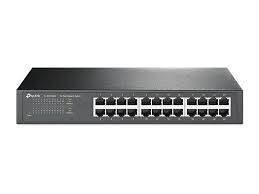
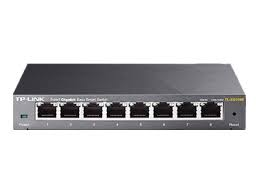
A switch is a network device that connects multiple devices within a single network, typically a Local Area Network (LAN). It operates at Layer 2 (Data Link Layer) of the OSI model.
1.1. Function and Operation
Function: Its primary function is to forward data packets (also called frames) to their correct destination device. Unlike a simple hub, which broadcasts data to all connected devices, a switch intelligently learns the MAC address of each device on its ports and only sends the data to the intended recipient. This reduces network traffic and improves efficiency.
Operation: When a data frame enters a switch, it reads the destination MAC address. It then looks up this address in its internal table (MAC address table) to find the port associated with that address. If it finds a match, it forwards the frame out of that specific port. If the address isn't in its table, it broadcasts the frame to all ports, learns the MAC address of the reply, and updates its table for future use.
1.2. Use
Switches are used to build the internal structure of most wired networks, connecting computers, printers, servers, and other switches to create a seamless local network.
Switches are critical network devices operating at the Data Link Layer (Layer 2 of the OSI model), responsible for forwarding data frames within a local area network (LAN) based on MAC addresses. They come in two primary types: unmanaged and managed switches, each designed for different use cases, offering distinct levels of control, functionality, and complexity. Below is a detailed exploration of these switch types, their features, use cases, advantages, and disadvantages.
1. Unmanaged Switches
Unmanaged switches are basic, plug-and-play devices that require no configuration. They are designed to automatically handle data forwarding within a network, making them simple to deploy and use.
1.3. Key Characteristics and How they work
Key Characteristics
Plug-and-Play Operation: No user intervention is needed; the switch automatically learns MAC addresses and forwards frames.
Fixed Configuration: Preconfigured settings for speed, duplex mode, and other parameters, which cannot be modified.
Basic Functionality: Supports fundamental switching tasks, such as frame forwarding and collision domain separation.
No Management Interface: Lacks a web interface, command-line interface (CLI), or software for configuration.
Cost-Effective: Generally, less expensive due to simplicity and limited features.
How They Work
MAC Address Learning: When a device sends a frame, the switch records its MAC address and associated port in a MAC address table.
Frame Forwarding: Frames are sent only to the destination port (based on the MAC address), reducing unnecessary traffic.
Broadcast and Unknown Unicast: If the destination MAC address is unknown or a broadcast, the frame is sent to all ports except the source.
1.4. Advantages and Disadvantage
Advantages
Ease of Use: Requires no technical expertise; ideal for non-technical users.
Quick Deployment: Simply connect devices, and the switch starts working immediately.
Low Cost: Affordable for small networks or budget-conscious setups.
Low Maintenance: No need for ongoing configuration or monitoring.
Reliability: Fewer features mean fewer points of failure in basic operations.
Disadvantages
Limited Control: Users cannot customize settings like VLANs, QoS, or port prioritization.
No Monitoring: Lacks tools to track network performance or troubleshoot issues.
Scalability Issues: Not suitable for complex or growing networks requiring advanced features.
Security Limitations: No support for features like port security or access control lists (ACLs).
1.5. Use Cases
Home Networks: Connecting computers, gaming consoles, and smart TVs in a household.
Small Offices: Basic LAN setups with minimal devices and no need for advanced management.
Temporary Networks: Event-based or short-term setups where simplicity is prioritized.
Example: A 5-port unmanaged switch like the TP-Link TL-SG1005D used in a home to connect a router, PC, and smart TV.
2. Managed Switches
Managed switches offer advanced configuration options, allowing network administrators to customize and control network behavior. They provide features like VLANs, Quality of Service (QoS), and security settings, making them suitable for complex networks.
Key Characteristics
Configurable Settings: Support for VLANs, QoS, link aggregation, and more via a management interface (web, CLI, or SNMP).
Advanced Features:
VLANs: Segment networks for improved security and performance.
QoS: Prioritize traffic (e.g., VoIP or video streaming) for better performance.
Port Mirroring: Monitor traffic for troubleshooting.
Spanning Tree Protocol (STP): Prevents network loops in redundant setups.
Management Interfaces:
Web-based GUI for user-friendly configuration.
CLI for advanced scripting and automation.
SNMP (Simple Network Management Protocol) for remote monitoring.
Higher Cost: More expensive due to advanced hardware and software capabilities.
Types of Managed Switches:
Fully Managed: Full control over all features, used in enterprise settings.
Smart Switches: Partial management features, a middle ground between unmanaged and fully managed.
1.6. How They Work
Customizable Frame Forwarding: Administrators can define rules for frame handling (e.g., VLAN tagging, traffic prioritization).
Dynamic Management: Updates to the MAC address table or routing policies can be manually adjusted.
Monitoring and Diagnostics: Provide real-time data on traffic, errors, and port status.
Security Features: Support port security, MAC filtering, and 802.1X authentication.
Advantages
Flexibility: Customizable to meet specific network requirements (e.g., VLANs for department segmentation).
Scalability: Suitable for growing networks with complex needs.
Enhanced Security: Features like ACLs and port security protect against unauthorized access.
Traffic Optimization: QoS ensures critical applications (e.g., VoIP) receive priority.
Monitoring and Troubleshooting: Detailed insights into network performance via SNMP or port mirroring.
Redundancy Support: STP and link aggregation improve reliability.
Disadvantages
Higher Cost: More expensive than unmanaged switches due to advanced features.
Complexity: Requires technical expertise for setup and management.
Maintenance Overhead: Ongoing configuration and monitoring may be needed.
Power Consumption: Typically consumes more power due to advanced processing.
Use Cases
Enterprise Networks: Large organizations requiring VLANs for department separation and QoS for critical applications.
Data Centers: High-performance switching with redundancy and monitoring.
Educational Institutions: Campus networks with multiple VLANs for students, faculty, and administration.
VoIP and Video Networks: Prioritizing voice and video traffic for seamless performance.
1.7. Example
Example: A Cisco Catalyst 2950 (fully managed) or NETGEAR GS308T (smart switch) used in an office to configure VLANs and QoS for VoIP phones.
3. Detailed Comparison of Unmanaged and Managed Switches
Feature | Unmanaged Switch | Managed Switch |
Configuration | Plug-and-play, no configuration | Configurable via web, CLI, or SNMP |
Cost | Low | Medium to High |
Features | Basic frame forwarding | VLANs, QoS, STP, port mirroring, security |
Scalability | Limited | High |
Ease of Use | Very easy | Requires technical expertise |
Security | Minimal (no ACLs or port security) | Advanced (ACLs, 802.1X, MAC filtering) |
Monitoring | None | SNMP, port mirroring, traffic statistics |
Use Case | Home, small office | Enterprise, data centers, complex LANs |
4. Focus on Key Managed Switch Features
2. VLANs (Virtual Local Area Networks)
Purpose: Logically segment a physical network into multiple isolated networks.
Benefits:
Security: Prevents unauthorized access between departments (e.g., HR vs. IT).
Performance: Reduces broadcast traffic by limiting it to specific VLANs.
Organization: Groups devices by function, not physical location.
Example: In a school, VLAN 10 for students, VLAN 20 for faculty, and VLAN 30 for guests.
QoS (Quality of Service)
Purpose: Prioritize certain types of traffic to ensure performance for critical applications.
Benefits:
Ensures low latency for VoIP or video conferencing.
Allocates bandwidth for specific users or applications.
Manages congestion in high-traffic networks.
Example: Prioritizing Zoom traffic over email in a remote work setup.
Spanning Tree Protocol (STP)
Purpose: Prevents loops in networks with redundant paths, avoiding broadcast storms.
Benefits:
Enhances reliability by enabling backup paths.
Automatically disables redundant links until needed.
2.1. Example 2
Example: In a network with multiple switches, STP ensures only one active path exists.
Port Mirroring
Purpose: Copies traffic from one port to another for monitoring.
Benefits:
Aids in troubleshooting and network analysis.
Supports intrusion detection systems (IDS).
Example: Using Wireshark to analyze traffic mirrored from a busy server port.
5. Practical Exploration
Tool: Cisco Packet Tracer.
Hands-On Task:
Unmanaged Switch Simulation: Set up a LAN with an unmanaged switch and 4 devices. Test connectivity and observe automatic MAC address learning.
Managed Switch Simulation: Configure a managed switch with two VLANs (e.g., VLAN 10 for PCs, VLAN 20 for servers). Test inter-VLAN communication restrictions.
QoS Configuration: Prioritize simulated VoIP traffic on a managed switch and compare performance with a non-prioritized setup.
Observation: Compare the ease of setup for unmanaged vs. managed switches and the benefits of VLANs in traffic segmentation.
6. Choosing Between Unmanaged and Managed Switches
Unmanaged Switches:
Best for small, simple networks with no need for customization.
Ideal for non-technical users or temporary setups.
Example: A home network with a few devices.
2.2. Managed Switches
Managed Switches:
Best for networks requiring security, segmentation, or performance optimization.
Ideal for businesses, schools, or data centers.
Example: An enterprise with multiple departments needing VLANs and QoS.
Decision Factors:
Budget: Unmanaged switches are cheaper.
Network Size: Larger networks benefit from managed switches.
Technical Expertise: Managed switches require skilled administrators.
Requirements: Need for VLANs, QoS, or monitoring dictates a managed switch.
Discussion Question: Would you choose an unmanaged or managed switch for a 20-employee office with VoIP phones and a guest Wi-Fi network? Why?
2.3. Key Takeaways
Unmanaged Switches: Simple, cost-effective, and plug-and-play, ideal for small or non-complex networks but lack advanced features.
Managed Switches: Offer extensive control with VLANs, QoS, STP, and monitoring, suitable for complex, scalable, and secure networks.
VLANs and QoS: Critical for network segmentation and performance optimization in managed switches.
Use Case Matters: Choose based on network size, budget, and feature requirements.