Networking Device and Protocols
| Site: | Newgate University Minna - Elearning Platform |
| Course: | Fundamental of Computer Networking |
| Book: | Networking Device and Protocols |
| Printed by: | Guest user |
| Date: | Sunday, 5 July 2026, 9:09 AM |
Description
A network protocol is a standardized set of rules governing how data is formatted, transmitted, received, and interpreted across devices on a network. Think of it as the “language” that ensures different computers can understand each other—even with different hardware or software—and guarantees interoperability
1. Introduction
A hub is a basic networking device that connects multiple devices in a local area network (LAN), enabling them to communicate by broadcasting data to all connected devices. Operating at the Physical layer of the OSI model, hubs are simple, legacy devices that have largely been replaced by more advanced devices like switches in modern networks. However, understanding hubs is essential for grasping the evolution of networking technology and the fundamentals of network connectivity.
This lecture note explores the functions, operation, and use of hubs in networking, their role in the OSI and TCP/IP models, and their limitations compared to modern devices. It also provides practical examples and considerations for their deployment.
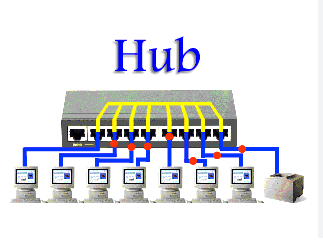
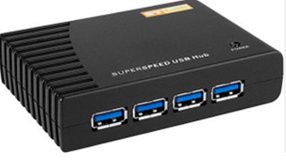
1.1. What is a Hub?
A hub is a network device that connects multiple devices (e.g., computers, printers) in a LAN, acting as a central point for data transmission. It receives data from one device and broadcasts it to all other connected devices, regardless of the intended recipient. Hubs are simple, unintelligent devices that operate at the Physical layer (Layer 1) of the OSI model, dealing solely with electrical or optical signals.
Key Role: Facilitates basic connectivity by relaying signals to all ports, enabling devices to share a network.
Common Use Cases: Small LANs in homes, small offices, or educational settings (primarily in the 1990s–early 2000s).
1.2. Functions of Hubs
Hubs perform the following key functions in a network:
1. Signal Broadcasting:
Receives incoming data (electrical or optical signals) from one port and retransmits it to all other ports.
Does not analyze or filter data, sending it to every connected device indiscriminately.
2. Device Connectivity:
Provides multiple ports (e.g., 4, 8, 16) to connect devices via Ethernet cables (e.g., RJ45 connectors).
Extends the reach of a network by amplifying signals to overcome distance limitations.
3. Signal Regeneration:
Amplifies and regenerates weak signals to ensure they can travel the required distance without degradation.
Helps maintain signal integrity in larger LANs.
4. Network Expansion:
Allows multiple devices to join a single network segment, creating a shared communication medium.
Supports star topology, where devices connect to the hub as a central point.
Operation of Hubs
Hubs operate in a straightforward, non-intelligent manner:
Data Reception: When a device sends data (e.g., a packet) to a hub via an Ethernet cable, the hub receives the electrical signals on one of its ports.
Broadcasting: The hub replicates the signals and sends them to all other ports, regardless of the intended recipient. This is known as a broadcast.
Collision Handling: Hubs operate in a shared collision domain, meaning all devices share the same bandwidth. If multiple devices send data simultaneously, a collision occurs, and devices use CSMA/CD (Carrier Sense Multiple Access with Collision Detection) to resolve it.
CSMA/CD Process:
1. Devices listen to check if the medium is free.
2. If free, they transmit; if not, they wait.
3. If a collision occurs, devices pause and retry after a random delay.
Half-Duplex Communication: Hubs support half-duplex mode, where devices can either send or receive data at a time, not both simultaneously.
1.3. Analogy
A hub is like a megaphone in a room: when one person speaks, the message is broadcast to everyone, whether they need to hear it or not. If multiple people speak at once, it creates confusion (collisions).
Types of Hubs
1. Passive Hubs:
Simply connect devices without amplifying signals.
Example: Basic wiring panels that split signals (rarely used today).
2. Active Hubs:
Amplify and regenerate signals, requiring power.
Example: Most Ethernet hubs (e.g., 10Base-T hubs).
3. Intelligent Hubs:
Include basic management features (e.g., monitoring traffic), though still simpler than switches.
Example: Managed hubs with diagnostic capabilities (less common).
1.4. Examples of Hubs and Protocols
Devices:
Consumer Hubs: Netgear EN104 (4-port Ethernet hub), D-Link DE-805TP (5-port hub).
Legacy Hubs: 3Com OfficeConnect, Linksys EFAH05W (common in the 1990s).
Protocols:
Ethernet Standards: IEEE 802.3 (e.g., 10Base-T for 10 Mbps, 100Base-T for 100 Mbps).
Physical Layer Protocols: Support for twisted-pair wiring (e.g., Cat5 cables), coaxial cables (e.g., 10Base2), or fiber optics.
Connectors: RJ45 for Ethernet, BNC for older coaxial-based hubs (e.g., 10Base2).
Use Cases of Hubs
Historical Use:
Widely used in the 1990s for small LANs in homes, schools, and small offices to connect computers and printers.
Example: Connecting a classroom’s computers to a single network for file sharing.
2. Legacy Systems:
Still found in some older setups or niche environments where cost is a concern and performance isn’t critical.
Example: Connecting legacy industrial equipment in a factory.
Testing and Education:
Used in labs to demonstrate basic networking concepts or collision domains.
Example: Networking courses teaching Physical layer operations.
Temporary Networks:
Deployed in temporary setups (e.g., events) where simple connectivity is needed.
Example: Connecting multiple devices at a small conference booth.
3. Hubs in the OSI and TCP/IP Models
OSI Model:
Physical Layer (Layer 1): Hubs operate exclusively at Layer 1, dealing with electrical/optical signals and physical connections.
Function: Transmits raw bits without interpreting data (no MAC address awareness).
Example: Relaying signals through Ethernet cables or fiber optics.
Link Layer: Hubs operate at the Physical component of the Link layer, handling signal transmission but not data link functions like framing or MAC addressing (handled by NICs).
Example: Broadcasting Ethernet signals to all connected devices.
4. Limitations of Hubs
Single Collision Domain:
All devices share the same bandwidth, leading to collisions when multiple devices transmit simultaneously, reducing efficiency.
No Intelligence:
Hubs lack the ability to filter or direct traffic to specific devices, unlike switches (which use MAC addresses).
Half-Duplex Only:
Cannot support full-duplex communication (simultaneous send/receive), limiting performance.
Scalability Issues:
Performance degrades as more devices are added due to increased collisions and bandwidth sharing.
Obsolete in Modern Networks:
Largely replaced by switches, which operate at the Data Link layer (Layer 2) and provide dedicated bandwidth per device, eliminating collisions.
4.1. Comparison with Other Devices
Hub vs. Switch:
Hub: Broadcasts data to all ports (Layer 1, shared collision domain).
Switch: Forwards data only to the intended device using MAC addresses (Layer 2, separate collision domains).
Why Switches Win: Switches are more efficient, support full-duplex, and scale better.
Hub vs. Router:
Hub: Connects devices in a single LAN, broadcasting signals (Layer 1).
Router: Routes packets between networks using IP addresses (Layer 3).
Key Difference: Hubs operate locally; routers connect networks (e.g., LAN to WAN).
Hub vs. Access Point:
Hub: Connects wired devices via Ethernet (Layer 1).
Access Point: Connects wireless devices to a wired network (Layers 1 and 2).
Key Difference: Hubs are wired; access points enable Wi-Fi.
4.2. Practical Considerations for Deployment
1. Deployment:
Connect devices to hub ports using Ethernet cables (e.g., Cat5e).
Place in a central location to minimize cable lengths (max 100 meters for Ethernet).
Ensure power supply for active hubs (via AC adapter or PoE).
2. Configuration:
Hubs are plug-and-play, requiring no configuration (no IP address or management interface).
Ensure devices use compatible Ethernet standards (e.g., 10/100 Mbps).
3. Limitations in Use:
Avoid using in high-traffic networks due to collision issues.
Limit the number of connected devices to reduce bandwidth contention.
4. Troubleshooting:
Check cable connections and port status (LED indicators on hubs).
Verify all devices use the same speed (e.g., 10 Mbps or 100 Mbps).
Replace with a switch if collisions or performance issues arise.
5. Summary Table
Aspect | Details |
Function | Connects devices in a LAN, broadcasting data to all ports. |
Operation | Receives signals, amplifies, and broadcasts to all connected devices; uses CSMA/CD for collisions. |
Protocols | IEEE 802.3 (Ethernet), 10Base-T, 100Base-T. |
Devices | Netgear EN104, D-Link DE-805TP, 3Com OfficeConnect. |
Layer (OSI) | Physical (Layer 1). |
Layer (TCP/IP) | Link Layer (Physical component). |
Use Cases | Small LANs, legacy systems, educational labs. |
Limitations | Single collision domain, half-duplex, no filtering, obsolete. |
6. Key Takeaways
Hubs are simple, Layer 1 devices that connect multiple devices in a LAN by broadcasting signals to all ports.
They operate by receiving, amplifying, and retransmitting data, using CSMA/CD to handle collisions.
Hubs are used in small, legacy, or educational networks but are inefficient due to shared bandwidth and collisions.
They function at the Physical layer (OSI) or Link layer (TCP/IP), dealing only with raw signals.
Modern networks favor switches for better performance, but hubs remain relevant for understanding networking basics.
Additional Notes
Historical Context: Hubs were common in the 1990s for Ethernet LANs (e.g., 10Base-T networks) but became obsolete with the rise of switches in the 2000s.
Troubleshooting Example: If devices on a hub can’t communicate:
Check Physical layer: Verify cable connections, port LEDs, or signal degradation.
Check for collisions: Monitor network performance; consider upgrading to a switch.
Educational Value: Hubs are useful for teaching the concept of collision domains and the evolution to switches.
7. FIrewall
Introduction
A firewall is a network security system that monitors and controls incoming and outgoing network traffic based on predetermined security rules. It acts as a barrier between a trusted network and an untrusted network, such as the internet.
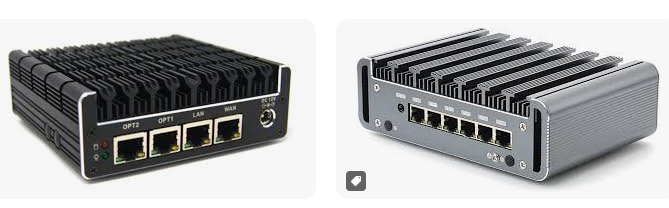
7.1. Function
Function
The primary function of a firewall is to:
- Block unauthorized access to or from a private network
- Allow authorized communication between networks
- Protect the network from malicious attacks, such as hacking and malware
- Log and report network traffic and security incidents
7.2. Importance
Firewalls are essential for:
- Network security: Firewalls prevent unauthorized access to sensitive data and systems
- Protection against malware and viruses: Firewalls can block malicious traffic and prevent the spread of malware
- Compliance: Firewalls are often required by regulatory bodies to ensure network security and data protection
7.3. Firewalls operate at the following layers
OSI Model
In the OSI model, firewalls operate at the following layers:
Network Layer (Layer 3): Firewalls can filter traffic based on source and destination IP addresses
Transport Layer (Layer 4): Firewalls can filter traffic based on source and destination port numbers
TCP/IP Model
In the TCP/IP model, firewalls operate at the following layers:
Internet Layer (equivalent to OSI Layer 3): Firewalls can filter traffic based on source and destination IP addresses
Transport Layer (equivalent to OSI Layer 4): Firewalls can filter traffic based on source and destination port numbers
In summary, firewalls are critical network security devices that control and monitor network traffic, protecting networks from unauthorized access and malicious attacks. They operate at the network and transport layers of both the OSI and TCP/IP models.