COMPUTER SOFTWARE
| Site: | Newgate University Minna - Elearning Platform |
| Course: | Introduction to Computer Science |
| Book: | COMPUTER SOFTWARE |
| Printed by: | Guest user |
| Date: | Sunday, 12 July 2026, 12:14 AM |
1. COMPUTER SOFTWARE
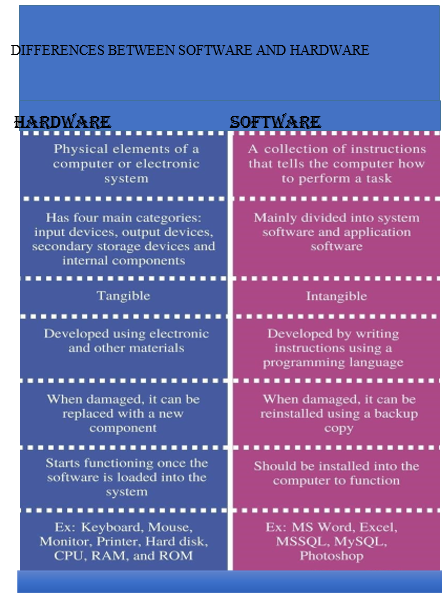
SOFTWARE: can be defined as the sets of programs that enable the computer to work. It can also be defines as a program written by a programmer or software developer in order to solve a particle specific task, or as step by step instructions that tell the hardware what to do. Software can be divided into two parts/categories.
Ø System software
Ø Application software
(A) SYSTEM SOFTWARE- These is sets of software that acts as interface between the computer resources and the users. It can also be defined as computer software designed to operate the computer hardware and to provide and maintain a platform for running application software.
FUNCTION OF SYSTEM SOFTWARE
1. Facilities the running of user program
2. Optimize the performance of the computer
3. Provide assistance with program development
4. Simplify the use of the computer system
TYPES OF SYSTEM SOFTWARE
1. Operating System (O S)
2. System services which are utility software and translators
3. Loaders
4. Diagnostic program
OPERATING SYSTEM (O S) –can be define as an organized collection of software extensions for hardware control routines for operating a computer and for providing an environment for execution of programs.
An operating system (OS) is system software that manages computer hardware and software and provides common services for computer programs.
An operating system (OS) is a program that manages the computer's resources --- its CPU, primary storage, its input/output devices --- so that the resources can be correctly and fairly used by one or more persons and/or computer programs
It can also be defined as a collection of programs that facilities the effective management of all these resources (hardware and software).2. History of Operating Systems
• The first computer, Z1, was made in 1936 – 1938. Unfortunately, this computer ran without an operating system.
• Twenty years later, the first-ever operating system was made in 1956 GM-NAA I/O by General MotorsIBM 704.
• In the 1960s, bell labs started working on building UNIX, the first multitasking operating system.
• In 1977 the apple series came into existence. Apple Dos 3.3 was the first disk operating system.
• In 1981, Microsoft built the first operating system called DOS by purchasing 86 – DOS software from a Seattle company.
• The most famous Microsoft windows came into existence in 1985 when MS-DOS was paired with GUI, a graphics environment.
TYPES OF OPERATING SYSTEM (O S)
1. Batch Operating System There is no direct communication between the computer and the OS
• There is an intermediate, the Operator, which needs to distribute the work into batches and sort similar jobs
• Multiple users can use it
• Can easily manager a large amount of work
2. Real-Time Operating System
• It has a data processing system
• The processing time is very small between the user‘s command and the output
• Used in fields where the response needs to be quick and rapid
3. Time-Sharing Operating System
• Multiple people at various terminals can use a program at the same time
• The main motive is to minimize the response time
4. Distributed Operating System
• When two or more systems are connected to each other and one can open files which are not present in their system but in other devices connected in the network
• Its usage has now increased over the years
• They use multiple central processors to serve real-time applications
• Failure of one system does not affect the other systems connected in the network
5. Embedded Operating System
• These special Operating systems are built into larger systems
• They generally are limited to single specific functions like an ATM
6. Network Operating System
• They have one main server which is connected to other client servers
• All the management of files, processing of data, access to sharing files, etc. are performed over this small network
• It is also a secure operating system for working with multiple users
7. Mobile Operating System
• With the advancement in the field of technology, smartphones now are released with an Operating system.
• They are designed in a manner that they can help a small device work efficiently
Functions of Operating System
1. Processor Management: An operating system manages the processor‘s work by allocating various jobs to it and ensuring that each process receives enough time from the processor to function properly.
2. Memory Management: An operating system manages the allocation and de-allocation of the memory to various processes and ensures that the other process does not consume the memory allocated to one process.
3. Device Management: There are various input and output devices. An OS controls the working of these input-output devices. It receives the requests from these devices, performs a specific task, and communicates back to the requesting process.
4. File Management: An operating system keeps track of information regarding the creation, deletion, transfer, copy, and storage of files in an organized way. It also maintains the integrity of the data stored in these files, including the file directory structure, by protecting against unauthorized access.
5. Security: The operating system provides various techniques which assure the integrity and confidentiality of user data. Following security measures are used to protect user data:
a. Protection against unauthorized access through login.
b. Protection against intrusion by keeping Firefall active.
c. Protecting the system memory against malicious access.
d. Displaying messages related to system vulnerabilities.
6. Error Detection: From time to time, the operating system checks the system for any external threat or malicious software activity. It also checks the hardware for any type of damage. This process displays several alerts to the user so that the appropriate action can be taken against any damage caused to the system.
Job Scheduling: In a multitasking OS where multiple programs run simultaneously, the operating system determines which applications should run in which order and how time should be allocated to each application.3. EXAMPLES OF OPERATING SYSTEM
1. LINUX
2. MS-DOS (MICROSOFT DISK OPERATING SYSTEM)
3. UNIX
4. XENIX
5. NOVELL NETWARE
6. macOS
7. IOS
8. ANDROID
9. MICROSOFT WINDOWS (MS WINDOWS : VERSION OF MS WINDOWS)
- WINDOW VISTA
- WINDOWS 95
- WINDOWS 98
- WINDOWS 2000
- WINDOWS ME (M4ILLENNIUM EDITION)
- WINDOWS 7
- WINDOWS 8
- WINDOWS 8.1
- WINDOWS 10
- WINDOWS 11
- WINDOWS X P EXPERIENCE
- WINDOWS N T, (NEW TECHNOLOGY) ü WINDOWS SERVER 2003
|
Name of the OS |
Release Date |
|
UNIX |
1969 |
|
MS-DOS |
1981 |
|
Windows |
1985 1999 |
|
Blackberry OS |
|
|
Mac OS |
2001 |
|
Ios |
2007 |
|
Android |
2008 |
|
Windows Phone |
2010 |
|
Chrome OS |
2011 |
|
Firefox OS |
2013 |
4. APPLICATION SOFTWARE
(B) APPLICATION SOFTWARE
Application software is programs written to solve user‘s problems. They are divided into two
I. User application
II. Application packages
Ø USER APPLICAFTION SOFTWARE: refers to as programs written for the user
within an organization or programs written to solve specific user needs. It‘s called also tailormade / purpose written application software
Examples of user application software might include:
• Enterprise Resource Planning (ERP) Systems: Custom-built to integrate and manage various business processes such as finance, human resources, and supply chain management.
• Customer Relationship Management (CRM) Software: Tailor-made to manage
customer interactions, track sales leads, and streamline customer-related processes.
• Inventory Management Systems: Customized to efficiently track and manage inventory levels, orders, and supply chain logistics.
• Data Analysis and Reporting Tools: Developed to analyze and present data in a way that aligns with the specific requirements of an organization.
Ø APPLICATION PACKAGES: These are commercialized software designed to perform various categories of user function.
Application package can also be defined as software designed to perform a group of
coordinated functions, tasks, or activities for the benefits of the user
EXAMPLES OF AN Application package
1. Word processor
2. Spreadsheet
3. Web processor
4. Web browser
5. Email client
6. Media player
7. Console game
5. CATEGORIES OF APPLICATION PACKAGES
I. Application specific
II. General purpose application packages
I. Application specific: These are programs written in order to solve a particular task/problem. Examples of application specific are
1. Payroll
2. Stock control
3. Accounting software
4. Education management
5. Statistical software
6. Web design software
II. General purpose application: These are programs written in order to provide users with general set of facilities to handle a wide variety of problems. Examples of general purpose application are
2. Graphics software
3. Game software
4. Database software