
EDITING SYMBOLS
Proofreading marks, also known as editing symbols, are a system of standardized symbols used to indicate corrections and changes in written text. These marks are typically handwritten on a document to highlight errors in punctuation, spelling, capitalization, formatting, and more. They allow editors and proofreaders to communicate needed changes clearly and efficiently.
Here's a breakdown of common editing symbols and their meanings:
1. Punctuation:
Insert a comma: ,
Insert a period: .
Insert a semicolon: ;
Insert a colon: :
Insert an apostrophe: '
Insert quotation marks: "
Insert parentheses: ()
Insert brackets: []
Insert an ellipsis: ...
Insert an en dash: –
Insert an em dash: —
Insert a hyphen: =
2. Spelling and Word Choice:
Delete: del or ^ (with a line through the text)
Delete and close up: ⁐
Transpose: tr or ~ (switch the order of letters, words, or phrases)
Spell out: spo
Replace: ^ (with suggested replacement in margin)
Wrong word: WW
Correct spelling: sp
3. Capitalization and Formatting:
Capitalize: caps (or underline the initial letter of the word)
Lowercase: lc
Bold: bf (or a wavy underline)
Italics: ital (or a single underline)
Flush left: fl
Flush right: fr
Center: ] [
Move text left: [
Move text right: ]
Begin a new paragraph: 
No paragraph: ¶ no
Let it stand: stet (often used with a dashed underline)
Close up: ⁐ (remove extra space)
4. Spacing:
Insert space: #
Make spacing equal: eq #
5. Other Common Symbols:
Insert: ^ (with the inserted text in the margin)
Insert a supersript: ^
Insert a subscript: v
Transpose: tr or ~ (with a line over the text)
Wrong font: wf
Too wordy: WDY
Awkward wording: AWK
Insert Hairspace: h #
Substitute/replace: s/r
Although a significant amount of editing and proofreading is now done using tools such as Microsoft’s track changes feature and Adobe’s commenting tool, you may find yourself faced with traditional proofreading marks and symbols on a printed document someday.
The following list shows some of the most common proofreading marks and symbols used by proofreaders and editors – and explains their meaning (note that some proofreaders will use different symbols than those shown here; if you see a symbol on a document and you’re not sure what it means, ask your proofreader).
 Insert something; the text to be inserted will likely be provided in the margin
 Delete
 Close up space
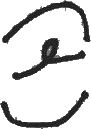 Delete and close up
 Add space
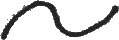 Transpose
 Spell out
 Make uppercase
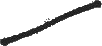 Make lowercase
 Let stand
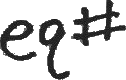 Make equal space
 Insert a comma
 Insert period
 Insert semicolon
 Insert colon
 Insert hyphen
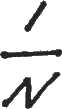 Insert en dash
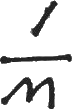 Insert em dash
 Insert apostrophe
 Insert question mark
 Insert exclamation mark
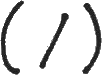 Insert parentheses
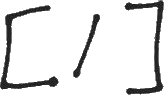 Insert brackets
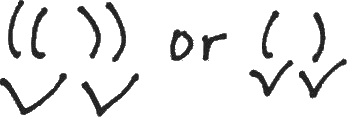 Insert quotation marks
 Set as bold
 Set as italics
 Wrong font
 Move left
 Move right
 Move up
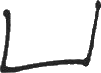 Move down
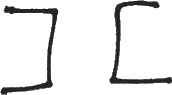 Center
 Begin paragraph