
Unit 1: Powerpoint Presentation
PowerPoint is a presentation program that allows you to create dynamic slide presentations. These presentations can include animation, narration, images, videos, and much more. Microsoft PowerPoint is a robust application that allows you to combine text, graphics, and predesigned backgrounds to create professional presentations. MS PowerPoint gives the opportunity for the text, graphics, multimedia objects, and animation elements to be combined in one place to allow the users to present information in a more effective way.
Understanding the PowerPoint Interface
The PowerPoint Program provides the presenter with an easy-to-use interface for designing and updating the presentation. It is important to master its main functions in order to conduct operations using this software with a level of proficiency. Here's a breakdown of the MS PowerPoint interface:
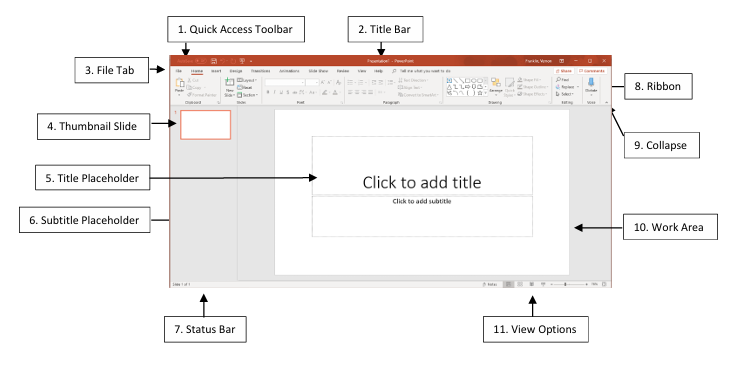
1. Quick Access Toolbar: Displays quick access to commonly used commands.
2. Title Bar: Displays the name of the open file.
3. File Tab: It helps you to manage the Microsoft application and provides access to options uch as Open, New, Save As, Print, etc.
4. Thumbnail Slide: Displays a snapshot of each slide.
5. Title Placeholder: Section where text is entered.
6. Subtitle Placeholder: Section where text and/or graphics are entered.
7. Status Bar:Displays information about the slide presentation, such as page numbers.
8. Ribbon: Displays groups of related commands within tabs. Each tab provides buttons for commands.
9. Collapse: Collapses the ribbon so only the tab names show.
10. Work Area: Each slide has an area where text and graphics are entered for a presentation. There are various slide layouts to work from.
11. View Option: Displays several View modes for slides.