Networking Technologies
| Site: | Newgate University Minna - Elearning Platform |
| Course: | Fundamental of Computer Networking |
| Book: | Networking Technologies |
| Printed by: | Guest user |
| Date: | Sunday, 5 July 2026, 9:09 AM |
Description
Networking technologies encompass the tools, protocols, devices, and architectures that enable computers and devices to connect, communicate, and share resources across various distances and environments These technologies form the foundational infrastructure of the internet, enterprise systems, smart homes, and cloud service
1. Routers
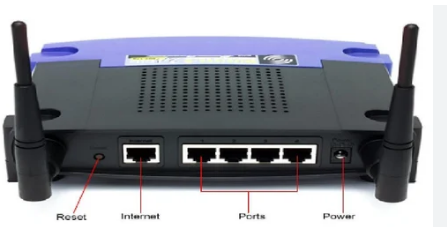
A router is a device that connects two or more different networks together, such as your home network to the internet. It operates at Layer 3 (Network Layer) of the OSI model.
1.1. Function of Router
Function: Its main function is to "route" data packets from one network to another. It uses IP addresses to determine the best path for a packet to travel across interconnected networks to its final destination. It's the traffic cop of the internet, directing data where it needs to go.
Operation: When a data packet arrives at a router, the router inspects the packet's destination IP address. It then consults its routing table, a list of known network paths, to find the most efficient route. It forwards the packet to the next router along that path until it reaches its final network.
Use: Routers are essential for providing internet access to a LAN. They connect your private home or office network to your Internet Service Provider's (ISP) network, allowing multiple devices on your local network to share a single internet connection.
2. Modem
What is a Modem?
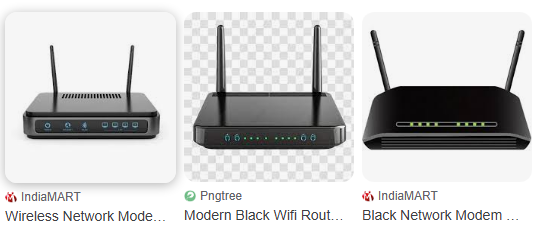
A modem (short for modulator-demodulator) is a hardware device that enables digital devices, like computers, to communicate over analog transmission lines (e.g., telephone lines, cable TV coax, or fiber optics). It acts as a translator between the digital signals your device produces (binary 0s and 1s) and the analog signals used by most communication networks. Without modems, the internet as we know it wouldn't be accessible to end-users.
Modems are essential for internet access because the internet backbone relies on a mix of digital and analog infrastructure. They bridge the gap, converting data into transmittable forms and vice versa, allowing billions of devices to connect globally.
A modem (short for modulator-demodulator) is a device that translates digital signals from your computer into analog signals that can be transmitted over a telephone, cable, or fiber line.
2.1. Diagram of Modem
2.2. Analog/Digital Conversion: The Core Function
Modems perform two key processes: modulation and demodulation. These handle the conversion between digital data and analog signals.
1.Modulation: Converts digital data (from your computer) into an analog signal suitable for transmission over physical media like phone lines or cables. This involves encoding binary data onto a carrier wave (e.g., varying amplitude, frequency, or phase of the wave). Think of it like packing your digital "message" into an analog "envelope" for shipping.
2.Demodulation: The reverse process—extracts digital data from an incoming analog signal. It decodes the wave to retrieve the original binary information.
How It Works (Simplified Step-by-Step)
1. Digital Input: Your device sends binary data (e.g., a web page request).
2. Encoding/Modulation: The modem maps bits to analog variations (e.g., using Quadrature Amplitude Modulation or QAM, which combines amplitude and phase shifts for efficiency).
3. Transmission: The analog signal travels over the medium (e.g., twisted-pair copper wires).
4. Reception/Demodulation: At the other end (e.g., ISP server), another modem reverses the process, reconstructing the digital data.
5. Error Handling: Modern modems include forward error correction (FEC) and signal amplification to combat noise, interference, or distance-related degradation.
This conversion is crucial because early telecom networks were analog (voice-focused), while computers are digital. Even in "all-digital" fiber networks, modems handle edge conversions for compatibility.
2.3. Visual Analogy
Imagine digital data as a series of light switches (on/off). Modulation turns that into a varying radio tune (analog wave) that can travel far. Demodulation flips the switches back on at the destination.
Role in Internet Access
Modems are the gateway device for home/office internet, connecting your local network (LAN) to the wide-area network (WAN) like the ISP's infrastructure. Their evolution has driven internet speed and accessibility:
Historical Role (Dial-Up Era, 1990s–2000s): Acoustic couplers and early modems (e.g., 56Kbps V.90 standard) used phone lines. They "dialed" an ISP, interrupting voice service. Conversion was slow due to analog phone line limitations—data rates topped out at ~56 Kbps because of FCC power regulations on phone lines.
2.4. Modern Role
Modern Role (Broadband Era):
DSL Modems: Use existing phone lines but in a higher frequency band (to avoid voice interference). Digital Subscriber Line (DSL) modems achieve 1–100 Mbps via advanced modulation like DMT (Discrete Multi-Tone).
Cable Modems: Leverage TV coax cables for DOCSIS standards, hitting 1 Gbps+ downstream. They use hybrid fiber-coax (HFC) networks, where the ISP's core is fiber (digital), but the "last mile" to homes is coax (analog-converted).
Fiber Optic Modems (ONTs/ONUs): For GPON/EPON, these handle optical-to-electrical conversion (analog light signals to digital electricity). Speeds exceed 1 Gbps symmetrically.
Mobile/5G Modems: In routers or phones, they modulate data over radio waves (wireless analog medium) for cellular internet.
Satellite Modems: For rural areas (e.g., Starlink), they convert data to/from microwave signals.
3. Key Impacts on Internet Access
Key Impacts on Internet Access
Enables Connectivity: Without modems, your router couldn't interface with ISP lines—it's the "handshake" device.
Scalability: Advances in modulation (e.g., from QPSK to 1024-QAM) have boosted speeds 1000x since dial-up, supporting streaming, gaming, and IoT.
Security/Protocols: Modems often integrate NAT, firewalls, and PPPoE for authentication, ensuring secure access.
Challenges: Signal attenuation over distance requires equalizers; in shared media (cable), contention reduces speeds during peak hours.
3.1. Key Impacts on Internet Access
Type of Modem | Medium | Max Speed (Typical) | Analog/Digital Focus | Common Use Case |
Dial-Up | Phone line (POTS) | 56 Kbps | Heavy analog conversion (voice band) | Legacy/rural backup |
DSL (e.g., VDSL) | Phone line (twisted-pair) | 100 Mbps | Digital over analog lines (separate bands) | Affordable wired broadband |
Cable (DOCSIS 3.1) | Coax cable | 1 Gbps+ downstream | Hybrid (QAM modulation on coax) | Urban cable TV bundles |
Fiber (GPON) | Optical fiber | 2.5 Gbps symmetric | Optical (light) to electrical digital | High-speed FTTH (Fiber to the Home) |
5G/Wi-Fi Modem | Wireless (radio) | 1–10 Gbps | RF modulation (OFDM) | Mobile hotspots, untethered access |
Satellite | Microwave/radio | 100–500 Mbps | Beamformed analog waves | Remote/global coverage |
Modems are the unsung heroes of the internet—quietly converting worlds of data so you can binge-watch or browse without a second thought. If broadband feels "digital," it's because modems hide the analog messiness. For deeper dives (e.g., on specific standards like DOCSIS), let me know.
4. Access Points
Access Points (Wireless Networking)
Introduction
An Access Point (AP) is a critical network device that enables wireless devices (e.g., smartphones, laptops, IoT devices) to connect to a wired network, typically using Wi-Fi. It acts as a bridge between wireless clients and the wired infrastructure, facilitating seamless communication in wireless local area networks (WLANs). Access points are essential for modern networking, powering wireless connectivity in homes, offices, schools, and public spaces.
This lecture note explores the functions, components, types, and examples of access points, their role in wireless networking, and their integration within the TCP/IP and OSI models. It also covers practical considerations for deployment and configuration.
4.1. Access Point Diagram
4.2. What is an Access Point?
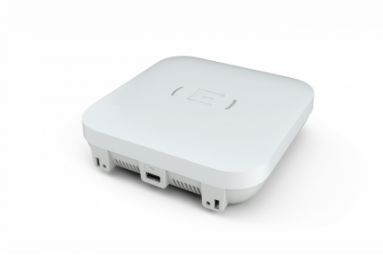
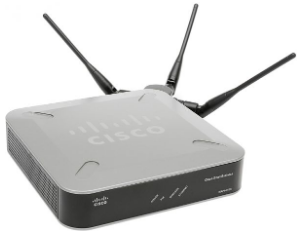
An Access Point (AP) is a networking device that allows wireless-capable devices to connect to a wired network, typically via Wi-Fi. It serves as a central hub for wireless communication, transmitting and receiving radio signals to enable data exchange between wireless clients (e.g., phones, laptops) and the wired network (e.g., a router or switch connected to the internet).
Key Role: Acts as a bridge or translator between wireless (radio-based) and wired (Ethernet-based) networks.
Common Use Cases: Home Wi-Fi networks, enterprise WLANs, public hotspots (e.g., coffee shops, airports), and IoT device connectivity.
4.3. Functions of Access Points
Access points perform several critical functions to enable wireless networking:
1. Wireless Connectivity:
Transmits and receives radio signals using Wi-Fi standards (e.g., IEEE 802.11 a/b/g/n/ac/ax).
Allows devices to join a WLAN without physical cables.
Supports multiple devices simultaneously via multiple access techniques (e.g., CSMA/CA - Carrier Sense Multiple Access with Collision Avoidance).
2. Bridging Wired and Wireless Networks:
Connects wireless clients to the wired network infrastructure (e.g., a router or switch).
Translates wireless data frames (802.11) into Ethernet frames (802.3) and vice versa.
3. Network Access Control:
Authenticates devices using security protocols (e.g., WPA2, WPA3) to ensure only authorized users connect.
Assigns IP addresses to clients (often via DHCP relayed from a router).
4. Signal Management:
Manages radio frequency (RF) channels to minimize interference.
Adjusts signal strength and coverage (e.g., via antenna configuration or power settings).
Supports multiple frequency bands (2.4 GHz, 5 GHz, 6 GHz for Wi-Fi 6E).
5. Data Forwarding:
Forwards data between wireless clients and the wired network or other wireless devices.
Supports Quality of Service (QoS) to prioritize traffic (e.g., for VoIP or video streaming).
6. Roaming Support:
Enables seamless handoff between multiple access points in large networks (e.g., enterprise campuses), allowing devices to move without losing connectivity.
4.4. Components of an Access Point
Radio Transceiver: Sends and receives wireless signals using Wi-Fi protocols.
Antennas: Broadcast and capture radio waves (internal or external, depending on the AP model).
Processor and Memory: Handles data processing, encryption, and traffic management.
Ethernet Port(s): Connects the AP to the wired network (e.g., via a router or switch).
Power Supply: Typically powered via Power over Ethernet (PoE) or a dedicated power adapter.
Firmware/Software: Manages configuration, security, and protocol support (e.g., 802.11 standards, WPA3).
4.5. Types of Access Points
1. Standalone Access Points:
Single devices configured individually, suitable for small networks (e.g., homes, small offices).
Example: TP-Link EAP225, Netgear WAX202.
2. Controller-Based Access Points:
Managed centrally by a wireless LAN controller, used in large-scale enterprise networks.
Example: Cisco Catalyst 9100 Series, Aruba Instant On.
3. Mesh Access Points:
Part of a mesh network, where multiple APs communicate wirelessly to extend coverage.
Example: Google Nest Wi-Fi, Eero Pro 6.
4. Outdoor Access Points:
Designed for rugged environments with weatherproofing and extended range.
Example: Ubiquiti UniFi UAP-AC-M, Ruckus T310.
5. Cloud-Managed Access Points:
Configured and monitored via cloud-based platforms, ideal for distributed networks.
Example: Meraki Go, Aruba Central-managed APs.
Examples of Access Points and Protocols
Devices:
Consumer: TP-Link Archer series, Netgear Nighthawk, ASUS BRT-AC828.
Enterprise: Cisco Aironet, Ubiquiti UniFi, Aruba 500 Series.
Mesh: Amazon Eero, Google Nest Wi-Fi.
Protocols:
Wi-Fi Standards: IEEE 802.11a/b/g/n/ac/ax (Wi-Fi 4, 5, 6).
Security: WPA2, WPA3, WEP (legacy).
Management: SNMP (Simple Network Management Protocol), CAPWAP (Control and Provisioning of Wireless Access Points).
Auxiliary: DHCP (for IP assignment), ARP (Address Resolution Protocol for mapping IP to MAC addresses).
5. Role in Wireless Networking
Enabling Mobility: APs provide wireless connectivity, allowing devices to move freely within their coverage area (e.g., a home or office).
Extending Network Reach: Multiple APs can create a larger WLAN, covering campuses or buildings via roaming or mesh setups.
Supporting Diverse Devices: Connects smartphones, laptops, IoT devices (e.g., smart TVs, cameras), and more to the network.
Enhancing Performance: Modern APs support high-speed Wi-Fi (e.g., Wi-Fi 6 with speeds up to 9.6 Gbps) and multiple-input multiple-output (MIMO) for simultaneous connections.
Security: Implements encryption (e.g., WPA3) and authentication to protect data and prevent unauthorized access.
6. Access Points in the TCP/IP and OSI Models
Link Layer: APs operate primarily at the Link layer, handling physical transmission (radio signals) and data link functions (e.g., framing, MAC addressing).
Example: Wi-Fi (802.11) for wireless transmission, ARP for address resolution.
Higher Layers: APs may interact indirectly with the Internet (e.g., forwarding IP packets) and Application layers (e.g., supporting DHCP or SNMP).
OSI Model:
Physical Layer (Layer 1): Manages radio signal transmission and hardware interfaces (e.g., antennas, Ethernet ports).
Data Link Layer (Layer 2): Handles framing, MAC addressing, and error detection for Wi-Fi communication.
Bridge Functionality: APs act as Layer 2 bridges, translating between 802.11 (Wi-Fi) and 802.3 (Ethernet) frames.
7. Practical Considerations for Deployment and Configuration
1. Placement:
Position APs centrally to maximize coverage, avoiding walls or interference sources (e.g., microwaves, cordless phones).
Use multiple APs for large areas, ensuring overlapping coverage for roaming.
2. Configuration:
SSID (Service Set Identifier): Set a unique network name for the WLAN.
Channel Selection: Choose non-overlapping channels (e.g., 1, 6, 11 for 2.4 GHz) to reduce interference.
Security: Enable WPA3 or WPA2 encryption; set strong passwords.
IP Settings: Configure via DHCP or static IP for integration with the wired network.
3. Performance Optimization:
Use dual-band (2.4 GHz and 5 GHz) or tri-band (adding 6 GHz) APs for better performance.
Implement QoS to prioritize critical traffic (e.g., video calls over downloads).
4. Scalability:
In enterprise settings, use controller-based or cloud-managed APs for centralized management.
Deploy mesh APs for areas without easy access to Ethernet cabling.
5. Troubleshooting:
Check signal strength (e.g., using Wi-Fi analyzer apps).
Verify AP firmware updates for performance and security.
Monitor for interference or channel conflicts.
8. Summary Table
Aspect | Details |
Function | Connects wireless devices to wired networks, bridges Wi-Fi and Ethernet. |
Key Protocols | IEEE 802.11 (Wi-Fi), WPA2/WPA3, ARP, DHCP, SNMP. |
Devices | TP-Link EAP, Cisco Aironet, Ubiquiti UniFi, Google Nest Wi-Fi. |
Layer (TCP/IP) | Link Layer (physical transmission, MAC addressing). |
Layer (OSI) | Physical (Layer 1), Data Link (Layer 2). |
Use Cases | Home Wi-Fi, enterprise WLANs, public hotspots, IoT connectivity. |
9. Key Takeaways
Access points are essential for wireless networking, enabling devices to connect to wired networks via Wi-Fi.
They operate primarily at the Link layer (TCP/IP) or Physical/Data Link layers (OSI), handling radio signals and framing.
APs support key functions like connectivity, security, and roaming, using protocols like 802.11 and WPA3.
Different types (standalone, mesh, cloud-managed) suit various environments, from homes to enterprises.
Proper deployment and configuration (e.g., SSID, channel, security) ensure optimal performance and coverage.
Additional Notes
Comparison with Routers: Unlike routers (which operate at the Internet/Network layer and route between networks), APs focus on wireless-to-wired bridging at the Link/Data Link layer. Many home “routers” combine AP, router, and switch functions.
Modern Trends: Wi-Fi 6/6E APs offer faster speeds, lower latency, and better support for IoT devices, critical for 5G and smart homes.
Troubleshooting Example: If Wi-Fi is slow, check:
Physical Layer: Signal strength, interference (e.g., from other devices).
Data Link Layer: Channel conflicts, MAC address filtering.
Configuration: SSID settings, encryption type.