
Unit 1
HTML Attribute
HTML attributes provide additional information about HTML elements.
• All HTML elements can have attributes
• Attributes provide additional information about elements
• Attributes are always specified in the start tag
• Attributes usually come in name/value pairs like: name="value"
1. The href Attribute
The <a> tag defines a hyperlink. The href attribute specifies the URL of the page the link goes to:
Example: <a href="https://www.newgateuniversityminna.edu.ng.com">Visit newgate</a>
2. The Src Attribute
The <img> tag is used to embed an image in an HTML page. The src attribute specifies the path to the image to be displayed:
Example: <img src="img_girl.jpg">
3. The width and Height Attribute
The <img> tag should also contain the width and height attributes, which specify the width and height of the image (in pixels):
Example: <img src="img_girl.jpg" width="500" height="600">
4. The Style Attribute
The style attribute is used to add styles to an element, such as color, font, size, and more.
Example: <p style="color:red;">This is a red paragraph.</p>
5. The Lang Attribute
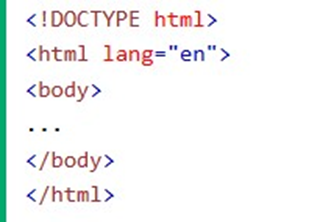
You should always include the lang attribute inside the <html> tag, to declare the language of the Web page. This is meant to assist search engines and browsers.
The following example specifies English as the language:
6. The Title Attribute
The title attribute defines some extra information about an element.The value of the title attribute will be displayed as a tooltip when you mouse over the element:
Example: <p title="I'm a tooltip">This is a paragraph.</p>
Exercise: Research for the complete list of all attributes for HTML element