
Basics of Data Communication
This module offers an overview of data and communication. Addressing primarily the basic concept: data, information, communication, and computer networks. The primary aim of data communication and networking is to provide the uninterrupted transfer of data between any two locations globally. The transmission of data occurs over a computer network.
1. Basics of Data Communication
Module One
At the end of this Module, students should be able to:
- Identify the types and sources of data;
- explain the transmission definitions and modes: one-way, half-duplex, and duplex transmission;
- understand the transmission techniques: parallel vs. serial, synchronous vs. asynchronous transmission;
- understand bit and character synchronization, and
- efficiency of transmission, error detection methods, and data compression
1.0 Introduction
This module offers an overview of data and communication. Addressing primarily the basic concept: data, information, communication, and computer networks. The primary aim of data communication and networking is to provide the uninterrupted transfer of data between any two locations globally. The transmission of data occurs over a computer network.
1.1 Basics of Data Communication
Data means the unprocessed facts that are acquired.
Information describes processed data that allows decision-making.
Thus, data is any information that is presented in a way that both its makers and its users agree upon and approve.
Information or data exchange is known as data communication. This form of communication takes place between nodes in a computer network via a transmission medium. The procedure calls for a software-and-hardware-based communication system. The hardware component includes the devices that transmit and receive data as well as any intermediary equipment. The software component includes rules that outline the content, format, and timing of all communications. Another name for it is a protocol. Before diving into the specifics of what makes up a data communications system, this part will provide you a rundown of the essential traits that any good data communication process must possess.
Four fundamental characteristics, that is; delivery, accuracy, timeliness, and jitter determine the performance of a data communications system.
i. Delivery: The system is required to transmit data to the appropriate location. The intended device or user must receive the data, and only that device or user can do so.
ii. Accuracy: The communication system must transmit the data precisely, without incurring any inaccuracies. Data that have been modified during transmission and remain incorrect are rendered unusable.
iii. Timeliness: The system must provide data promptly. Data obtained late are unused. In the context of video and audio, timely delivery refers to the transmission of data as it is generated, in the precise sequence of its production, and without considerable delay. This type of delivery is referred to as real-time transmission.
iv. Jitter: Indicates the fluctuation in the timing of packet arrivals. Irregular jitter can alter the punctuality of data transmission.
1.2 Components of Data Communication
There are five components in a data communication system. These are:
1. Message: The message constitutes the information transmitted from the sender to the receiver. The message includes the information (data) intended for communication. Common modes of information include text, numerical data, images, audio, and video.
2. Sender: The transmitter is the device that transmits the data message. It may include a computer, workstation, telephone handset, video camera, etc. A transmitter is any device capable of transmitting data (message).
3. Receiver: The receiver is the device that receives the message. It can be a computer, workstation, telephone handset, television, and so on.
4. Transmission medium: It is the route that a message takes from its sender to its recipient. There are many forms of both wired and wireless technology. The physical route a message takes to get from sender to recipient is known as the transmission channel. Coaxial cable, fiber-optic cable, twisted pair wire, and radio waves are a few types of mediums for transmission as shown in Figure 1.1.
5. Protocol: is a set of established guidelines that both the sender and the recipient utilize to exchange data. A protocol is a collection of guidelines that control the exchange of data. Without a protocol, data transmission would be like two people attempting to communicate with each other in a foreign language without knowing the other language.
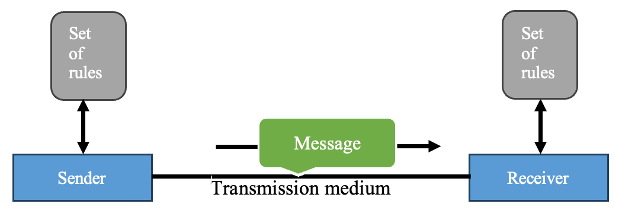
Figure 1.1: Components of a Data Communication System
Note: In the context of networking, the devices are commonly referred to as nodes.
1.3 Data Representation
There is a possibility that data can be represented in a
variety of formats.
The following is a list of some of the form of data that is utilized in
communications:
1. Text: The representation of text in data communications is by the use of a bit pattern, which is a sequence of bits (either Os or Is). The representation of text symbols has been developed with a number of various sets of bit patterns. The process of representing symbols is referred to as coding, and each set is referred to as a code. At the present time, the most widely used coding system is known as Unicode. This system uses 32 bits to represent a symbol or character that may be used in every language in the world. Base Latin is another name for the American Standard Code for Information Interchange (ASCII), which was developed in the United States some decades ago. It is currently the first 127 characters in Unicode and is also known as Basic Latin.
2. Numbers: Numbers are also defined by bit patterns. But a code like ASCII is not employed to indicate numbers; instead, the number is instantly transformed into a binary format for simpler mathematical operations. Numbers comprises a collection of digits ranging from 0 to 9.
3. Image: Are represented using binary patterns. An image fundamentally consists of a matrix of pixels (picture elements), with each pixel representing a tiny dot. The pixel size is contingent upon the resolution. An image can be segmented into 1,000 pixels or 10,000 pixels. In the second scenario, the image is represented with superior resolution; however, it requires increased memory for storage. Once an image is segmented into pixels, each pixel is allocated a bit pattern. The dimensions and significance of the pattern are dependent upon the image. For a picture composed solely of black and white dots (e.g., a checkerboard), a 1-bit pattern suffices to represent a pixel. If an image has pixels that are not pure white or pure black, you can expand the bit pattern to incorporate grayscale. To illustrate four levels of grayscale, one can employ 2-bit patterns. A black pixel is denoted by 00, a dark gray pixel by 01, a light gray pixel by 10, and a white pixel by 11. Multiple techniques exist for the representation of color images. One technique is referred to as RGB, named for its composition of three fundamental colors: red, green, and blue. The intensity of each color is calculated, and a corresponding bit pattern is allocated to it. Another technique is referred to as YCM, when a color is produced by a synthesis of three primary colors: yellow, cyan, and magenta.
4. Audio: Audio pertains to the recording or transmission of sound or music. Audio fundamentally differs from word, numerical data, or visuals. It is continuous rather than discrete. Employing a microphone to convert voice or music into an electrical signal result in the generation of a continuous signal.
5. Video: The term “video” describes the process of capturing and sharing moving images. In order to create the illusion of motion, video can be either one continuous image (as seen through a television camera) or a composite of many images. In addition, we have the option to convert video to either digital or analog.
1.4 MODES OF DATA TRANSMISSION
In order to establish communication between devices, they transmit and receive data. Data transmission between the two devices may occur in the following modes:
1. Simplex
2. Semi-duplex
3. Full Duplex
1. Simplex: In simplex mode, communication is unidirectional, similar to a one-way street. One of the two devices on a link is capable of transmitting, while the other is only capable of receiving (Figure 1.2). Simplex devices include keyboards and conventional monitors. The monitor can only receive output; the keyboard can only provide input. The simplex mode has the ability to transmit data in a single direction by utilizing the entire channel's capacity. This means that only one of the devices transmits data, while the other device exclusively receives it. For instance, in the diagram below, the CPU transmits data, while the monitor solely receives it.
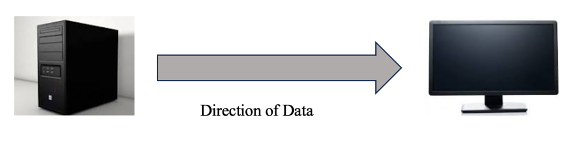
Figure 1.2: Simplex mode of data communication
2. Semi-duplex: Is also known as half-duplex. In a semi-duplex system, both stations are capable of transmitting and receiving—but not simultaneously. Figure 1.3 illustrates that when one device is transmitting, the other can only receive, and the reverse is also true. For instance, a walkie-talkie and CB (citizens band) radios.
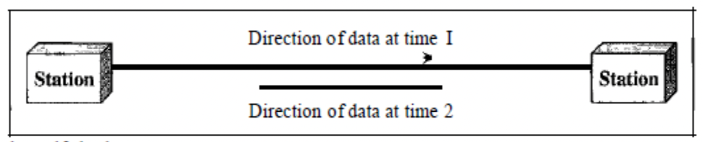
Figure 1.3: Semi- duplex mode of data communication
3. Full-duplex: In full-duplex mode, both stations are capable of transmitting and receiving simultaneously. The full-duplex mode is analogous to a two-way street, where traffic is simultaneously moving in both directions. Signals that travel in one direction share the link's capacity with signals that travel in the opposite direction in full-duplex mode. The telephone network is a prevalent illustration of full-duplex communication. Two individuals can converse and listen simultaneously when they are communicating via a telephone line as seen in Figure 1.4 below. When continuous communication in both directions is necessary, the full-duplex mode is implemented. Nevertheless, the channel's capacity must be apportioned between the two directions. In full duplex mode, both stations are capable of simultaneously transmitting and receiving. For instance, mobile phones.
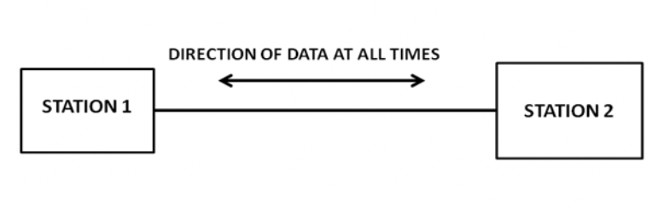
Figure 1.4: Full- duplex mode of data communication
1.4 Computer Network
A network comprises a collection of devices, commonly known as nodes, interconnected by communication lines. A node may refer to a computer, printer, or any device capable of transmitting and/or receiving data produced by other nodes inside the network. A computer network is defined as a structure of nodes. A node refers to any device that may broadcast or receive data. The communicative nodes must be interconnected by communication links. In other words, a computer network is defined as a collection of nodes. The communicative nodes must be interconnected by communication links. A computer network must guarantee the dependability of data connection, secure data performance by attaining increased flow and reduced latency.
1.4.1 Requirements for a Network
In order to be considered valid, a network must fulfill several requirements. Out of all these, reliability, security, and performance are the most crucial.
Reliability: Network robustness in the face of a disaster, the time it takes for a link to recover from a failure, and the frequency of failure are all metrics that contribute to reliability, alongside delivery accuracy.
Security: Ensuring the security of a network involves preventing unauthorized individuals from gaining access to data, safeguarding data from harm and development, and putting measures in place to recover from breaches and data losses.
Performance: Transfer time and response time are two of several performance metrics. A message's transit time is the time it takes to go from one terminal to another. A response time measures how long it takes to get a reply to a query. Many things affect a network's performance. These include the number of users, the transmission medium, the linked hardware's capabilities, and the software's efficiency. Two measures commonly used to assess performance in networking are throughput and latency. With less delay and more throughput, we are often happier. But there are times when these two standards run counter to one another. The throughput might go up if we try to flood the network with data, but the delay would go up due to traffic congestion.